Setup Django WorkFlow Application

Introduction

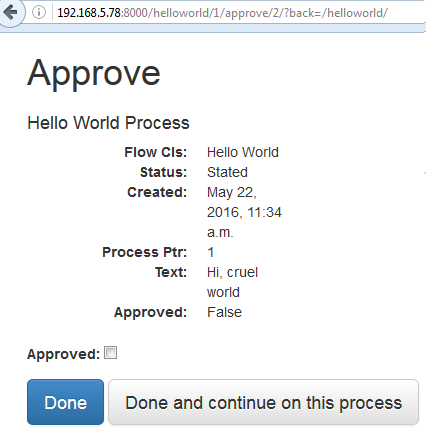
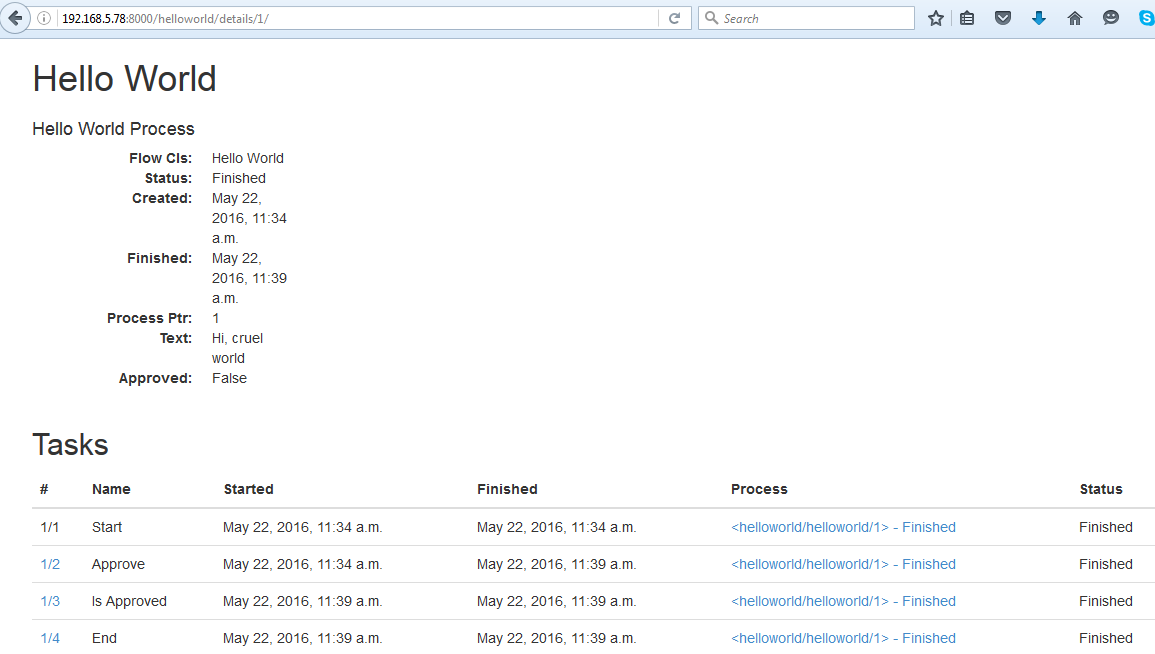
Recently, I studied how to setup a work flow program using python django. Believe me, Python Diango can provide you a high quality work flow web application. Let’s say I would like a simple workflow application as below diagram. I will show you how to setup the application as below instruction, and I will also show you the screen dump examples of running the application.
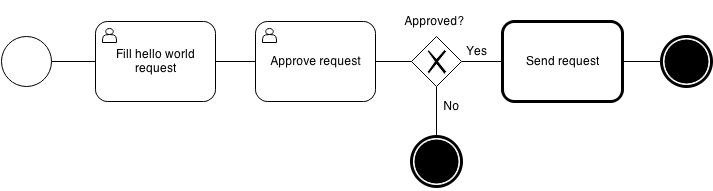
django-workflow0

Step 1. Prerequisition

This Work Flow Program requires Python 3.3 or greater, and django 1.6 or 1.7. I recommend you to setup under virtual environment. Setup the following python plug-in by running the following command:

$ pip3 install Django==1.7.1
$ pip3 install WebOb==1.4
$ pip3 install WebTest==2.0.16
$ pip3 install amqp==1.4.6
$ pip3 install anyjson==0.3.3
$ pip3 install beautifulsoup4==4.3.2
$ pip3 install billiard==3.3.0.18
$ pip3 install celery==3.1.16
$ pip3 install django-fsm==2.2.0
$ pip3 install django-viewflow==0.7.0
$ pip3 install django-webtest==1.7.7
$ pip3 install kombu==3.0.23
$ pip3 install mock==1.0.1
$ pip3 install pytz==2014.9
$ pip3 install singledispatch==3.4.0.3
$ pip3 install six==1.8.0
$ pip3 install waitress==0.8.9

Step 2. Create a standard django project and application

Run the following command:

$ django-admin.py startproject demo .

$ ./manage.py startapp helloworld

$ mv helloworld/ demo/

Step 3. Edit or Create the following files

3.1 edit demo/settings.py

INSTALLED_APPS = (
    ‘django.contrib.admin’,
    ‘django.contrib.auth’,
    ‘django.contrib.contenttypes’,
    ‘django.contrib.sessions’,
    ‘django.contrib.messages’,
    ‘django.contrib.staticfiles’,
    ‘viewflow’,
    ‘demo.helloworld’
)

TEMPLATE_CONTEXT_PROCESSORS = (
    ‘django.contrib.auth.context_processors.auth’,
    ‘django.core.context_processors.request’,
)

3.2 edit demo/urls.py

from django.conf.urls import patterns, include, url
from django.contrib import admin
from viewflow import views as viewflow
from .helloworld.flows import HelloWorldFlow

urlpatterns = patterns(
    ”,
    url(r’^helloworld/’,
        include([
            HelloWorldFlow.instance.urls,
            url(‘^$’, viewflow.ProcessListView.as_view(), name=’index’),
            url(‘^tasks/$’, viewflow.TaskListView.as_view(), name=’tasks’),
            url(‘^queue/$’, viewflow.QueueListView.as_view(), name=’queue’),
            url(‘^details/(?P<process_pk>d+)/$’,
                viewflow.ProcessDetailView.as_view(), name=’details’)],
                namespace=HelloWorldFlow.instance.namespace),
            {‘flow_cls’: HelloWorldFlow}),
    #url(r’^flows/’, include(viewflow.urls)),
    url(r’^admin/’, include(admin.site.urls)),
    url(r’^accounts/login/$’, ‘django.contrib.auth.views.login’, name=’login’),
    url(r’^accounts/logout/$’, ‘django.contrib.auth.views.logout’, name=’logout’),
)

3.3 create demo/celery.py

import os
from celery import Celery

from django.conf import settings

os.environ.setdefault(‘DJANGO_SETTINGS_MODULE’, ‘demo.settings’)

app = Celery(‘tests’)

app.config_from_object(‘django.conf:settings’)
app.autodiscover_tasks(lambda: settings.INSTALLED_APPS)

3.4 create demo/helloworld/flows.py

from viewflow import flow
from viewflow.base import Flow, this
from viewflow.contrib import celery

from . import models, views, tasks

class HelloWorldFlow(Flow):
    process_cls = models.HelloWorldProcess

    start = flow.Start(views.CreateRequestView)
        .Next(this.approve)

    approve = flow.View(views.ApproveRequestView)
        .Next(this.is_approved)

    is_approved = flow.If(lambda p: p.approved)
        .OnTrue(this.send)
        .OnFalse(this.end)

    send = celery.Job(tasks.send)
        .Next(this.end)

    end = flow.End()

3.5 edit demo/helloworld/models.py

from django.db import models
from viewflow.models import Process

class HelloWorldProcess(Process):
    text = models.CharField(max_length=250)
    approved = models.BooleanField(default=False)

3.6 edit demo/helloworld/tasks.py

from demo.celery import app as celery_app
from viewflow.flow import flow_job

@celery_app.task()
@flow_job()
def send(activation):
    print(activation.process.text)

3.7 edit demo/helloworld/views.py

from django.views import generic
from viewflow import views as flow_views

class CreateRequestView(flow_views.StartViewMixin,
                        generic.UpdateView):
    fields = [“text”]

    def get_object(self):
        return self.activation.process

class ApproveRequestView(flow_views.TaskViewMixin,
                         generic.UpdateView):
    fields = [“approved”]

    def get_object(self):
        return self.activation.process

Step 4. Start the Application Server

Run the following Command:

./manage.py createsuperuser –username=admin –email=admin@admin.com
( setup admin password )

./manage.py makemigrations

./manage.py migrate

Start the following celery in another virtual env

celery -A demo worker -l info

Start the application server:

./manage.py runserver

Step 4. Run the Application from browser

Admin Logon

http://127.0.0.1:8000/admin/

WorkFlow Application Logon

http://127.0.0.1:8000/helloworld/
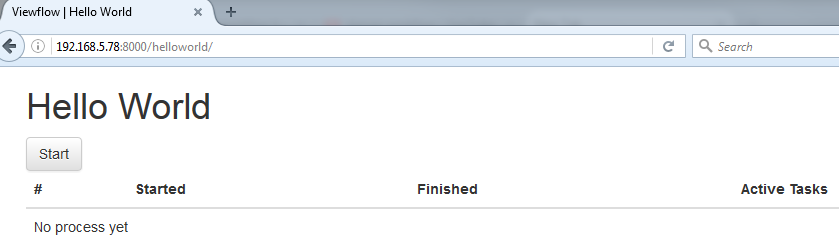
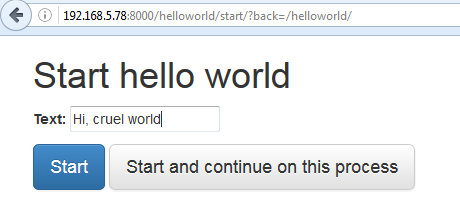
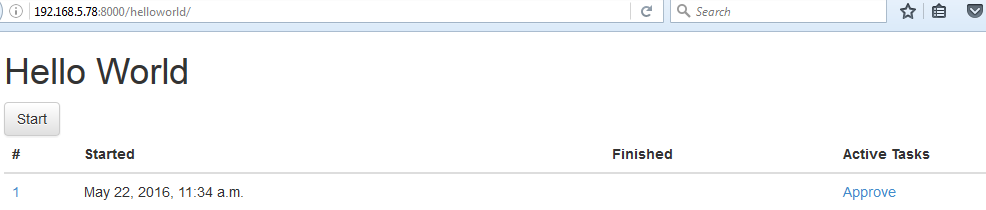
Step 5. Screen Dump Example of running the WorkFlow Application

django-workflow1

django-workflow2

django-workflow3
django-workflow4
django-workflow5

Reference Document Link:

http://viewflow.io/

http://docs.viewflow.io/material_admin.html

https://pypi.python.org/pypi/django-viewflow

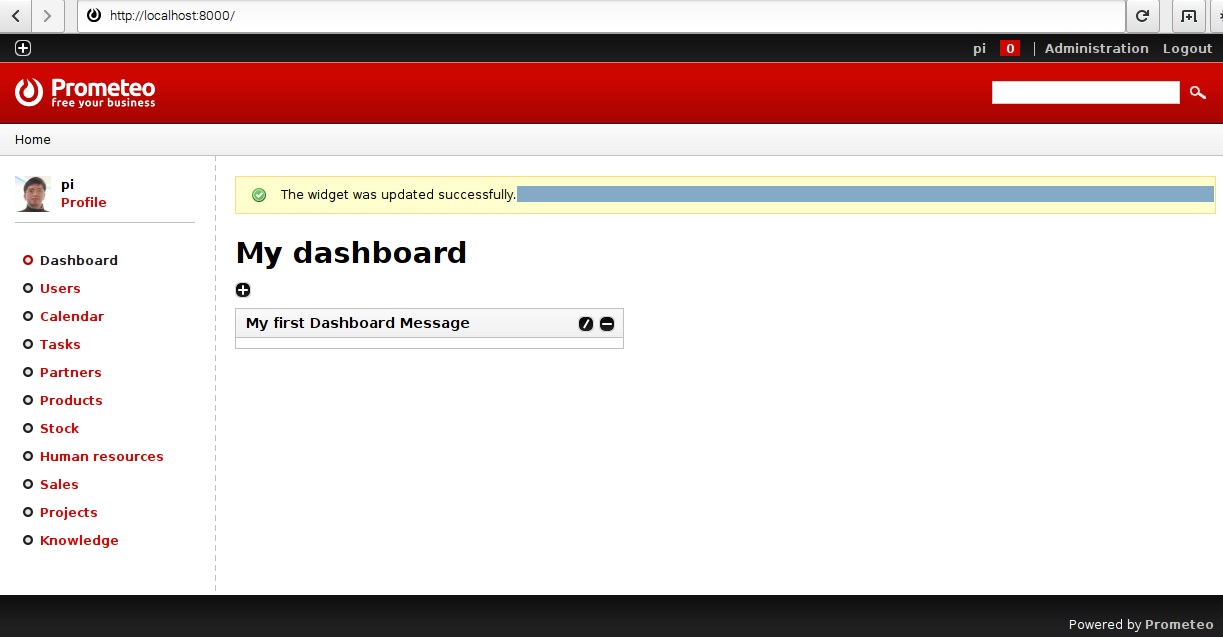
Prometeo-ERP System (An Open Source ERP System)

Introduction

Recently, I found a open source ERP application project which was developed by python and django framework. Prometeo is absolutely an open-source and free of charge. It is very user friendly and user-oriented, too.

Installation

1. Checkout sources from the GIT repository:

git clone https://emanuele.bertoldi@code.google.com/p/prometeo-erp/ prometeo

http://code.google.com/p/prometeo-erp

https://code.google.com/archive/p/prometeo-erp/

https://code.google.com/archive/p/prometeo-erp/source/default/source

2. Follow the instructions in the README file from the download.

3. Test the installation at http://localhost:8000 running the development server:

python manage.py runserver

Further Development

This Prometeo-ERP project is no longer maintained nor supported! However, it is succeeded by another project called django ERP, which is still under developing. Its link is –> https://github.com/djangoERPTeam/django-erp

Steps to Install Django-cms in Raspberry Pi

Introduction

django CMS is a modern web publishing platform built with Django, the web application framework “for perfectionists with deadlines”. Django CMS offers out-of-the-box support for the common features you’d expect from a CMS, but can also be easily customised and extended by developers to create a site that is tailored to their precise needs. The following will show you how step by step of Django CMS installation, and also with screen dump examples.

Installation Steps

start a virtual environment under Raspberry Pi
1.  sudo pip install virtualenv
2.  virtualenv env
3.  sourse env/bin/activate

Install Djangocms-Installer and create a project
1.  pip install djangocms-installer
2.  djangocms -p project project
Use default value for most questions
select lang = en, fr, de
Use default username : pi   then input your password

Start CMS Application
1.  cd project
j2.  python manage.py runserver
3.  You can browse the CMS web site via link http://127.0.0.1:8000/

Select a CMS template from Start Bootstrap
1.  http://startbootstrap.com/template-overviews/modern-business/   –> download
2.  copy css, font-awesome, fonts, js directories from download to project/project/static
3.  copy full-width.html to project/project/templates directory
4.  Edit line in settings.py

CMS_TEMPLATES = (
## Customize this
(‘fullwidth.html’, ‘Fullwidth’),
(‘sidebar_left.html’, ‘Sidebar Left’),     –> Delete
(‘sidebar_right.html’, ‘Sidebar Right’)    –> Delete
)

5.  Delete    ./templates/sidebar_left.html      sidebar_right.html

6.  Edit the full-width.html file as below:

{% load cms_tags menu_tags sekizai_tags staticfiles %}
<!DOCTYPE html>
<html lang=”{{ LANGUAGE_CODE }}”>

<head>

<meta charset=”utf-8″>
<meta http-equiv=”X-UA-Compatible” content=”IE=edge”>
<meta name=”viewport” content=”width=device-width, initial-scale=1″>
<meta name=”description” content=”{% page_attribute ‘meta_description’ %}”>
<meta name=”author” content=””>

<title>{% page_attribute ‘page_title’ %}CMS</title>

<!– Bootstrap Core CSS –>
<link href=”{% static “css/bootstrap.min.css” %}” rel=”stylesheet”>

<!– Custom CSS –>
<link href=”{% static “css/modern-business.css” %}” rel=”stylesheet”>

<!– Custom Fonts –>
<link href=”{% static “font-awesome/css/font-awesome.min.css” %}” rel=”stylesheet” type=”text/css”>

….
<![endif]–>
{% render_block “css” %}
</head>

<body>
{% cms_toolbar %}
<!– Navigation –>
….

{% show_menu 0 100 100 100 %}     and delete lines as below:
<div class=”collapse navbar-collapse” id=”bs-example-navbar-collapse-1″>
<ul class=”nav navbar-nav navbar-right”>
{% show_menu 0 100 100 100 %}
</ul>
</div>
<!– /.navbar-collapse –>
….

<!– jQuery –>
<script src=”{% static “js/jquery.js” %}”></script>

<!– Bootstrap Core JavaScript –>
<script src=”{% static “js/bootstrap.min.js” %}”></script>
<% render_block “js” %}
</body>

Change the line         <a class=”navbar-brand” href=”index.html”>Start Bootstrap</a>
To                      <a class=”navbar-brand” href=”/”>New CMS Name</a>

7.  Rename   base.html    to base-bak.html
Rename   full-width.html   base.html

8.  Restart the server and test.

Screen Dump of Installation

pi@gopi1:~ $ pip install virtualenv
pi@gopi1:~ $ virtualenv env
New python executable in /home/pi/env/bin/python
Installing setuptools, pip, wheel…done.
pi@gopi1:~ $ source env/bin/activate
(env) pi@gopi1:~ $ pip install djangocms-installer
Collecting djangocms-installer
Downloading djangocms_installer-0.8.8-py2.py3-none-any.whl (56kB)
100% |████████████████████████████████| 61kB 714kB/s
Requirement already satisfied (use –upgrade to upgrade): argparse in /usr/lib/python2.7 (from djangocms-installer)
Collecting dj-database-url>=0.4 (from djangocms-installer)
Collecting six (from djangocms-installer)
Using cached six-1.10.0-py2.py3-none-any.whl
Requirement already satisfied (use –upgrade to upgrade): pip in ./env/lib/python2.7/site-packages (from djangocms-installer)
Collecting tzlocal (from djangocms-installer)
Collecting pytz (from tzlocal->djangocms-installer)
Using cached pytz-2016.4-py2.py3-none-any.whl
Installing collected packages: dj-database-url, six, pytz, tzlocal, djangocms-installer
Successfully installed dj-database-url-0.4.1 djangocms-installer-0.8.8 pytz-2016.4 six-1.10.0 tzlocal-1.2.2
(env) pi@gopi1:~ $ djangocms -p project project
Database configuration (in URL format) [default sqlite://localhost/project.db]:
django CMS version (choices: 2.4, 3.0, 3.1, 3.2, stable, develop) [default stable]:
Django version (choices: 1.4, 1.5, 1.6, 1.7, 1.8, 1.9, stable) [default stable]:
Activate Django I18N / L10N setting; this is automatically activated if more than language is provided (choices: yes, no) [default yes]:
Install and configure reversion support (choices: yes, no) [default yes]:
Languages to enable. Option can be provided multiple times, or as a comma separated list. Only language codes supported by Django can be used here: en, fr
Optional default time zone [default Asia/Hong_Kong]:
Activate Django timezone support (choices: yes, no) [default yes]:
Activate CMS permission management (choices: yes, no) [default yes]:
Use Twitter Bootstrap Theme (choices: yes, no) [default no]:
Use custom template set [default no]:
Load a starting page with examples after installation (english language only). Choose “no” if you use a custom template set. (choices: yes, no) [default no]:
Creating the project
Please wait while I install dependencies
Dependencies installed
Creating the project

Operations to perform:
Synchronize unmigrated apps: project, staticfiles, messages, djangocms_admin_style, sitemaps, sekizai, treebeard
Apply all migrations: djangocms_file, reversion, djangocms_inherit, sessions, admin, djangocms_column, djangocms_text_ckeditor, sites, auth, djangocms_video, menus, contenttypes, djangocms_picture, djangocms_googlemap, djangocms_style, djangocms_link, cms, djangocms_teaser
Synchronizing apps without migrations:
Creating tables…
Running deferred SQL…
Installing custom SQL…
Running migrations:
Rendering model states… DONE
Applying contenttypes.0001_initial… OK
Applying auth.0001_initial… OK
Applying admin.0001_initial… OK
Applying contenttypes.0002_remove_content_type_name… OK
Applying auth.0002_alter_permission_name_max_length… OK
Applying auth.0003_alter_user_email_max_length… OK
Applying auth.0004_alter_user_username_opts… OK
Applying auth.0005_alter_user_last_login_null… OK
Applying auth.0006_require_contenttypes_0002… OK
Applying sites.0001_initial… OK
Applying cms.0001_initial… OK
Applying cms.0002_auto_20140816_1918… OK
Applying cms.0003_auto_20140926_2347… OK
Applying cms.0004_auto_20140924_1038… OK
Applying cms.0005_auto_20140924_1039… OK
Applying cms.0006_auto_20140924_1110… OK
Applying cms.0007_auto_20141028_1559… OK
Applying cms.0008_auto_20150208_2149… OK
Applying cms.0008_auto_20150121_0059… OK
Applying cms.0009_merge… OK
Applying cms.0010_migrate_use_structure… OK
Applying cms.0011_auto_20150419_1006… OK
Applying cms.0012_auto_20150607_2207… OK
Applying cms.0013_urlconfrevision… OK
Applying cms.0014_auto_20160404_1908… OK
Applying djangocms_column.0001_initial… OK
Applying djangocms_file.0001_initial… OK
Applying djangocms_file.0002_auto_20151202_1551… OK
Applying djangocms_file.0003_remove_related_name_for_cmsplugin_ptr… OK
Applying djangocms_file.0004_set_related_name_for_cmsplugin_ptr… OK
Applying djangocms_googlemap.0001_initial… OK
Applying djangocms_inherit.0001_initial… OK
Applying djangocms_inherit.0002_auto_20150622_1244… OK
Applying djangocms_link.0001_initial… OK
Applying djangocms_link.0002_auto_20140929_1705… OK
Applying djangocms_link.0003_auto_20150212_1310… OK
Applying djangocms_link.0004_auto_20150708_1133… OK
Applying djangocms_link.0005_auto_20151003_1710… OK
Applying djangocms_link.0006_remove_related_name_for_cmsplugin_ptr… OK
Applying djangocms_link.0007_set_related_name_for_cmsplugin_ptr… OK
Applying djangocms_picture.0001_initial… OK
Applying djangocms_picture.0002_auto_20151018_1927… OK
Applying djangocms_style.0001_initial… OK
Applying djangocms_style.0002_set_related_name_for_cmsplugin_ptr… OK
Applying djangocms_teaser.0001_initial… OK
Applying djangocms_text_ckeditor.0001_initial… OK
Applying djangocms_text_ckeditor.0002_remove_related_name_for_cmsplugin_ptr… OK
Applying djangocms_text_ckeditor.0003_set_related_name_for_cmsplugin_ptr… OK
Applying djangocms_video.0001_initial… OK
Applying djangocms_video.0002_set_related_name_for_cmsplugin_ptr… OK
Applying menus.0001_initial… OK
Applying reversion.0001_initial… OK
Applying reversion.0002_auto_20141216_1509… OK
Applying sessions.0001_initial… OK
Creating admin user
Username (leave blank to use ‘pi’):
Email address: goldman.au168@gmail.com
Password:
Password (again):
Superuser created successfully.
All done!
Get into “/home/pi/cmsproj” directory and type “python manage.py runserver” to start your project
(env) pi@gopi1:~ $ cd project
(env) pi@gopi1:~/project $ ls
manage.py  media  project  project.db  requirements.txt  static
(env) pi@gopi1:~/project $ python manage.py runserver
Performing system checks…

System check identified no issues (0 silenced).
May 08, 2016 – 15:05:32
Django version 1.8.13, using settings ‘project.settings’
Starting development server at http://127.0.0.1:8000/
Quit the server with CONTROL-C.
New revision!!!! RELOAD!
28495694-7c4f-409e-9605-c499bf16e97a (<type ‘str’>)
-> None (<type ‘NoneType’>)
reverse(‘my_test_app_view’): Reverse for ‘my_test_app_view’ with arguments ‘()’ and keyword arguments ‘{}’ not found. 0 pattern(s) tried: []
[08/May/2016 15:05:33] “GET /admin/ HTTP/1.1” 302 0
[08/May/2016 15:05:34] “GET /en/admin/ HTTP/1.1” 302 0
[08/May/2016 15:05:35] “GET /en/admin/login/?next=/en/admin/ HTTP/1.1” 200 3107
[08/May/2016 15:05:35] “GET /admin/ HTTP/1.1” 302 0
[08/May/2016 15:05:35] “GET /en/admin/ HTTP/1.1” 302 0
[08/May/2016 15:05:35] “GET /en/admin/login/?next=/en/admin/ HTTP/1.1” 200 3107
[08/May/2016 15:05:36] “GET /static/admin/css/base.css HTTP/1.1” 200 14049
[08/May/2016 15:05:36] “GET /static/admin/css/base.css HTTP/1.1” 200 14049
[08/May/2016 15:05:36] “GET /static/admin/css/login.css HTTP/1.1” 200 940
[08/May/2016 15:05:36] “GET /static/djangocms_admin_style/js/jquery.ui.touch-punch.min.js HTTP/1.1” 200 0
[08/May/2016 15:05:36] “GET /static/djangocms_admin_style/css/djangocms-admin.css HTTP/1.1” 200 151181
[08/May/2016 15:05:36] “GET /static/djangocms_admin_style/js/base-admin.js HTTP/1.1” 200 2910
[08/May/2016 15:05:36] “GET /static/djangocms_admin_style/js/drag-touch-support.js HTTP/1.1” 200 1200
[08/May/2016 15:05:36] “GET /static/admin/css/login.css HTTP/1.1” 200 940
[08/May/2016 15:05:37] “GET /static/djangocms_admin_style/fonts/django-admin-iconfont.woff?v=3.2.0 HTTP/1.1” 200 10612
[08/May/2016 15:07:16] “POST /en/admin/login/?next=/en/admin/ HTTP/1.1” 302 0
[08/May/2016 15:07:17] “GET /en/admin/ HTTP/1.1” 200 7525
[08/May/2016 15:07:17] “GET /static/admin/css/base.css HTTP/1.1” 304 0
[08/May/2016 15:07:17] “GET /static/admin/css/dashboard.css HTTP/1.1” 200 434
[08/May/2016 15:07:17] “GET /static/admin/css/dashboard.css HTTP/1.1” 200 434
[08/May/2016 15:07:17] “GET /static/djangocms_admin_style/css/djangocms-admin.css HTTP/1.1” 304 0
[08/May/2016 15:07:17] “GET /static/djangocms_admin_style/js/base-admin.js HTTP/1.1” 304 0
[08/May/2016 15:07:17] “GET /static/djangocms_admin_style/js/drag-touch-support.js HTTP/1.1” 304 0
[08/May/2016 15:07:17] “GET /static/djangocms_admin_style/js/jquery.ui.touch-punch.min.js HTTP/1.1” 304 0
[08/May/2016 15:07:17] “GET /static/djangocms_admin_style/img/icon_arrow_right.png HTTP/1.1” 200 15812
^C(env) pi@gopi1:~/project $ ls
manage.py  media  project  project.db  requirements.txt  static
(env) pi@gopi1:~/project $ cd project
(env) pi@gopi1:~/project/project $ ls
__init__.py   settings.py   static     urls.py   wsgi.py
__init__.pyc  settings.pyc  templates  urls.pyc  wsgi.pyc
(env) pi@gopi1:~/projectj/project $ cd /home/allusers/startboot*
(env) pi@gopi1:/home/allusers/startbootstrap-modern-business-1.0.5 $ ls
404.html          contact.html     index.html            portfolio-4-col.html
about.html        css              js                    portfolio-item.html
bin               faq.html         LICENSE               pricing.html
blog-home-1.html  font-awesome     portfolio-1-col.html  README.md
blog-home-2.html  fonts            portfolio-2-col.html  services.html
blog-post.html    full-width.html  portfolio-3-col.html  sidebar.html
(env) pi@gopi1:/home/allusers/startbootstrap-modern-business-1.0.5 $ cp -r css /home/pi/project/project/static
(env) pi@gopi1:/home/allusers/startbootstrap-modern-business-1.0.5 $ cp -r font-awesome /home/pi/project/project/static
(env) pi@gopi1:/home/allusers/startbootstrap-modern-business-1.0.5 $ cp -r fonts /home/pi/project/project/static
(env) pi@gopi1:/home/allusers/startbootstrap-modern-business-1.0.5 $ cp -r js /home/pi/project/project/static
(env) pi@gopi1:/home/allusers/startbootstrap-modern-business-1.0.5 $ cp full-width.html /home/pi/project/project/templates
(env) pi@gopi1:/home/allusers/startbootstrap-modern-business-1.0.5 $ cd /home/pi/project/project/templates
(env) pi@gopi1:~/project/project/templates $ ls
base.html        fullwidth.html     sidebar_right.html
full-width.html  sidebar_left.html
(env) pi@gopi1:~/project/project/templates $ ls -l
total 24
-rw-r–r– 1 pi pi 1122 May  8 15:01 base.html
-rwxr-xr-x 1 pi pi 6589 May  8 15:13 full-width.html
-rw-r–r– 1 pi pi  191 May  8 15:01 fullwidth.html
-rw-r–r– 1 pi pi  308 May  8 15:01 sidebar_left.html
-rw-r–r– 1 pi pi  308 May  8 15:01 sidebar_right.html
(env) pi@gopi1:~/project/project/templates $ vi full-width.html
(env) pi@gopi1:~/project/project/templates $ mv base.html base-bak.html
(env) pi@gopi1:~/project/project/templates $ mv full-width.html base.html
(env) pi@gopi1:~/project/project/templates $ cd ..
(env) pi@gopi1:~/project/project $ ls
__init__.py   settings.py   static     urls.py   wsgi.py
__init__.pyc  settings.pyc  templates  urls.pyc  wsgi.pyc
(env) pi@gopi1:~/project/project $ vi settings.py
(env) pi@gopi1:~/project/project $ cd templates
(env) pi@gopi1:~/project/project/templates $ ls
base-bak.html  base.html  fullwidth.html  sidebar_left.html  sidebar_right.html
(env) pi@gopi1:~/project/project/templates $ vi fullwidth.html
(env) pi@gopi1:~/project/project/templates $ cd ..
(env) pi@gopi1:~/project/project $ cd ..
(env) pi@gopi1:~/project $ python manage.py runserver
Performing system checks…

System check identified no issues (0 silenced).
May 08, 2016 – 15:33:06
Django version 1.8.13, using settings ‘project.settings’
Starting development server at http://127.0.0.1:8000/
Quit the server with CONTROL-C.

Screen Dump Result

After succeeded installation, you can browse the django CMS via link http://127.0.0.1:8000 as below screen  dump results.

djangocms1 djangocms2 djangocms3 djangocms4


BONUS:

If you make any change, you can run the following command:

python manage.py makemigrations

python manage.py migrate

Useful Add-On Plug-in:

pip install aldryn-style

pip uninstall djangocms-style

pip install aldryn-bootstrap3

Conduct a Range of ip Network Address Ping using Python

Intoduction

I would like to conduct a range of ip network address ping using python 3.5 script. It is easy. I will show you the python script and its screen dump result as below.

Python program script

# network ping program run for python3
# Import modules
import subprocess
import ipaddress

# Prompt the user to input a network address
net_addr = input(“Enter a network address in CIDR format(ex.192.168.1.0/24): “)

# Create the network
ip_net = ipaddress.ip_network(net_addr)

# Get all hosts on that network
all_hosts = list(ip_net.hosts())

# Configure subprocess to hide the console window
info = subprocess.STARTUPINFO()
info.dwFlags |= subprocess.STARTF_USESHOWWINDOW
info.wShowWindow = subprocess.SW_HIDE

# For each IP address in the subnet,
# run the ping command with subprocess.popen interface
for i in range(len(all_hosts)):
    output = subprocess.Popen([‘ping’, ‘-n’, ‘1’, ‘-w’, ‘500’, str(all_hosts[i])], stdout=subprocess.PIPE, startupinfo=info).communicate()[0]
    
    if “Destination host unreachable” in output.decode(‘utf-8’):
        print(str(all_hosts[i]), “is Offline”)
    elif “Request timed out” in output.decode(‘utf-8’):
        print(str(all_hosts[i]), “is Offline”)
    else:
        print(str(all_hosts[i]), “is Online”)

Screen dump result as below:

network-ping

Integrate Django with Apache

Introduction

As production run of a Django application, we can use tradition web server tools such as apache, IIS, etc. For example, I will show you to setup django running under apache as below.

Step 1 Install wsgi

Suppose you have already installed python, django, apache, then you need to install wsgi by running command:

sudo apt-get install libapache2-mod-wsgi

Step 2

Edit /etc/apache2/sites-available/000-default.conf as below:

<VirtualHost *:80>
        ServerName www.goldman168.no-ip.org
        #ServerAllas www.localhost
        ServerAdmin goldman.au168@gmail.com

        DocumentRoot /var/www/html/django-survey-master/
        WSGIScriptAlias / /var/www/html/django-survey-master/survey/wsgi.py

        Errorlog /var/www/logs/error.log
        CustomLog /var/www/logs/custom.log combined
</VirtualHost>

Step 3.

Edit /etc/apache2/apache.conf to add the following line to the end:

WSGIPythonPath /var/www/html/django-survey-master

Step 4.

Restart apache service by running command:  /etc/init.d/apache2 restart

Step 5.

Now, you do not need to run the django command (python manage.py runserver) to start the django application, you can browse the django application with link http://localhost/ via apache.

Setup a Survey Web Site with Python & Django

Introduction

This document shows how to setup a survey web site using python 2.7 and django 1.4. We do not need to use web server software such as IIS or Apache while python can start web server service itself. This survey web site can run under window and linux env provide that it has python. I will show its setup steps as below.

Step 1.

Download the program source code “django-survey-master.zip” from web site https://github.com/jessykate/djngo-survey and unzip it to a computer with python 2.7.

Step 2.

Under the django-survey-master directory, run the command $ pip install -r requirements.txt to install django.

Step 3.

Setup the survey database as command $ python manage.py syncdb , which you need to input a username and password.

Step 4.

Start the survey server as command $ python manage.py runserver ,as below screen dump:

survey1

Step 5.

Setup a survey as below screen dump with link http://127.0.0.1:8000/admin :

survey3

survey4

Step 6.

Browse the survey web site to fill-in a survey as below link http://127.0.0.1:8000 :

survey2

survey5

Bonus of a problem solving

Problem 1: The Survey web site is with link localhost:8000 and 127.0.0.1:8000 in its computer and that works fine. However, it cannot be accessed from other computer in the same network.

Solution 1: Start the Web Site Server with its own ip address, such as $ python manage.py runserver 192.168.5.105:8000; then other computers in the same network can access it with link http://192.168.5.105:8000.

Problem 2: If you have problem of running http://127.0.0.1:8000/admin, it comes out a error message “Admin Site: TemplateDoesNotExist at /admin/ …”

Solution 2: Force to re-download django with command:

pip install -r requirements.txt --ignore-installed --force-reinstall --upgrade --no-cache-dir

Comparison Video Conference Software (WebEx, TrueConf, AnyMeeting, GoToWebinar, Skype)

Introduction

I compared several web base webinars and video conference tools, anymeeting, GoToWebinar, Webex, TrueConf, Skype, with their screen dump example as below.

VC-Software

Testing

I tested WebEx between HK & PRC, which we can have meeting with video, audio, screen sharing. However, the video display is not stable as below screen dump because of low bandwidth.

WebEx1

I found another VC Tools, called TrueConf from http://trueconf.com/ . I tested its performance of cam video, voice, share picture file between HK & PRC, and I found it was better than WebEx on Cam display because it will not show a blank screen while it display a Cam picture during low bandwidth network. However, when sharing desktop, its screen was bad.

TrueConf1

TrueConf desktop sharing had latency problem as below:

TrueConf2

GoToWebinar is a webinar tools for presentation, but not a video conf tools. We can share video only from host to client, but no display from client to host.

GoToWebinar

The audio from AnyMeeting is bad, so that it is not a good choice, neither. Although the audio from WebEx is good, using the voice through WebEx consumes more bandwidth and it affects the video display.

AnyMeeting

Base on my experience in past, Skype is a good tool for audio communication, but not good from video. I always use it for audio conf, so that I did not test it this time.

I rate my testing result as below table:

 WebEx  GoToWebinar  AnyMeeting  Skype TrueConf
Audio  5  5 3  5 4
Video  3  4 4  2 3
Chat  5  5 5  5 5
Desktop/File Sharing  4  4 4  2 3
User Friendly 4 5 4  5 5
Usage Cost $99/month $99/month $78/month Free Free
Remark Sharing video only from host to client, but no display from client to host. I estimated the score of Skype base on my experience in past. I do not test it this time.

Note:  I estimate the score from range 1 to 5 where 1 for bad, and 5 for excellent.

Conclusion

WebEx is the best among other VC software but its video function sometimes has problem. Although WebEx have intermittent problem on camera video, its desktop sharing screen still can work during low network bandwidth. Hence, WebEx is the best VC solution from our testing.

IT人在工廠日記 – 假期清閒,玩圍棋消譴

近日因為AlphaGo(阿爾法)和李世石的比賽,挑起我的圍棋興致,我也趁熱鬧和電腦下幾盤圍棋,但是人始終有情緒、會疲倦、易分心…等等問題,不像電腦那樣表現穩定。我和電腦下棋,各有勝負,可是,遇到一局很特別的計分結果,原來日本計法和中國計法可以有不同的勝負結果,真難得,所以要分享給棋友們看看,如下圖示。

Go-game


Temperature Sensor Setup on Raspberry Pi

Introduction

Today, I setup my raspberry pi as a temperature sensor. I mainly use a LM35 temperature sensor and an IC “ADC0804” as an analog to digital converter. I also setup a database to record down the temperature data and then display result on web browser with Chat format. The connection of the whole electronics circuit is as below diagram. temp0

Program script:

1) The coding the a python program to take temperature data is as the temp_url.py program below:

#!/usr/bin/env python
# author: Powen Ko    Program Name:  temp_url.py
import time, RPi.GPIO as GPIO
import urllib

def fetch_thing(url, params, method):
params = urllib.urlencode(params)
if method==’POST’:
f = urllib.urlopen(url, params)
else:
f = urllib.urlopen(url+’?’+params)
return (f.read(), f.code)

GPIO.setmode(GPIO.BOARD)
GPIO.setup(7, GPIO.IN)
GPIO.setup(11, GPIO.IN)
GPIO.setup(12, GPIO.IN)
GPIO.setup(13, GPIO.IN)
GPIO.setup(15, GPIO.IN)
GPIO.setup(16, GPIO.IN)
GPIO.setup(18, GPIO.IN)
GPIO.setup(22, GPIO.IN)
while True:
     a0 = GPIO.input(7)
     a1 = GPIO.input(11)
     a2 = GPIO.input(12)
     a3 = GPIO.input(13)
     a4 = GPIO.input(15)
     a5 = GPIO.input(16)
     a6 = GPIO.input(18)
     a7 = GPIO.input(22)
     total=a0+(a1*2)+(a2*4)+(a3*8)+(a4*16)+(a5*32)+(a6*64)+(a7*128)
     temp=total*5*1000/256/10;
     print a7,a6,a5,a4,a3,a2,a1,a0,”[“,total,”]”,”[C=”,temp,”]”
     content, response_code = fetch_thing(
                    ‘http://127.0.0.1/settemp.php’,
                    {‘id’: 1, ‘temp’: temp},
                    ‘GET’
                    )
     time.sleep(5)

2) Then, I save the temperature data into the database via a web php program as below:

<?php
$con=mysqli_connect(“localhost”,”root”,”infotech”,”raspberryDB”);
if (mysqli_connect_errno()) {
echo “Failed to connect to MySQL: ” . mysqli_connect_error();
}

$now= date(‘Ymdhms’);
$id = $_GET[‘id’];
$temp = $_GET[‘temp’];
mysqli_query($con,”INSERT INTO temp (datatime,temp,userid)
VALUES ($now,$temp,$id)”);

mysqli_close($con);
echo “powenko.com get it”.”, date time=”.$now.”, temp=”.$temp.”, id=”.$id;
?>

Finally, I view data by using a php web browser program as below and also screen dump result as below:

<!doctype html>
<html>
        <head>
                <title>Bar Chart</title>
                <script src=”Chart.js-master/Chart.js”></script>
        </head>
        <body>
                <div style=”width: 50%”>
                        <canvas id=”canvas” height=”450″ width=”800″></canvas>
                </div>
<?php
$con=mysqli_connect(“localhost”,”root”,”infotech”,”raspberryDB”);
if (mysqli_connect_errno()) {
  echo “Failed to connect to MySQL: ” . mysqli_connect_error();
}

$result = mysqli_query($con,”SELECT * FROM temp”);

echo “<table border=’1′>
<tr>
<th>Date Time</th>
<th>Temperature</th>
<th>user ID </>

</tr>”;

while($row = mysqli_fetch_array($result))
{
  echo “<tr>”;
  echo “<td>” . $row[‘datatime’] . “</td>”;
  echo “<td>” . $row[‘temp’] . “</td>”;
  echo “<td>” . $row[‘userid’] . “</td>”;
  echo “</tr>”;
  $Lables=$Lables.'”‘. $row[‘datatime’].'”,’;
  $temps=$temps.'”‘. $row[‘temp’].'”,’;
}

echo “</table>”;
mysqli_close($con);
?>

        <script>
var barChartData = {
                labels : [<?php echo  $Lables;  ?>],
                datasets : [
                        {
                                fillColor : “rgba(20,20,20,0.5)”,
                                strokeColor : “rgba(220,220,220,0.8)”,
                                highlightFill: “rgba(220,220,220,0.75)”,
               highlightStroke: “rgba(220,220,220,1)”,
                                data : [<?php echo  $temps;  ?>
                                ]
                       }
                ]
        }
        window.onload = function(){
                var ctx = document.getElementById(“canvas”).getContext(“2d”);
                window.myBar = new Chart(ctx).Bar(barChartData, {
                        responsive : true
                });
        }
        </script>
        </body>
</html>

temp3

IT人在工廠日記 – 生意不景,又要找新工作

我在現時這家醫療設備工廠做了差不多一年,看著它由四條生產線減至一、二條生產線,工人由七百減至三百,但是要負擔百多名職員,今年的盈虧已經可以預計了,如果未來幾個月的生意不能改善,裁員是不可避免的。我要做好準備,又要開始積極地找另一份新工作了。