Introduction
Artificial Intelligence (AI) is increasingly becoming a practical assistant for project managers, rather than replacing the project manager, AI can automate repetitive administrative activities, analyze large amounts of project information, generate project documentation, identify patterns and risks, and provide information in a form that is easier for project teams and stakeholders to understand.
A project manager can therefore use AI throughout the project life cycle—from stakeholder communication and team development to requirements management, planning, delivery, measurement and risk management.
The objective of this article is to demonstrate how commonly available AI and automation tools can be combined into practical project-management workflows. The approach follows the eight Project Management Performance Domains and focuses on using AI to reduce administrative workload while allowing the project manager to spend more time on leadership, decision-making, stakeholder management and strategic activities.
The key principle is:
Project Information → AI Processing → Analysis / Automation → Management Insight → Human Decision → Project Action
AI-generated information should be treated as decision-support material rather than automatically accepted as fact. Project managers remain responsible for validating information, protecting confidential project data, obtaining stakeholder approval and making the final management decisions.
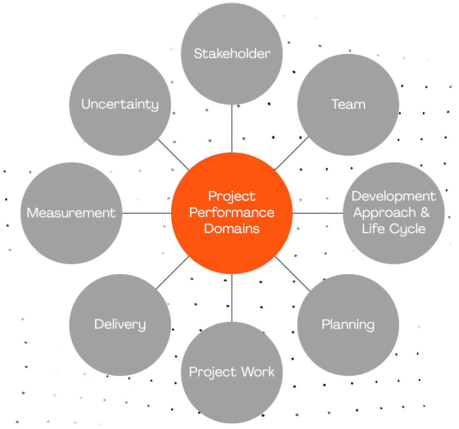
The following document will describe how AI tools can be applied to eight project management performance domains, as shown in the figure below.
1. Stakeholder Performance Domain
AI-Assisted Daily Meeting Summarisation
Effective stakeholder communication is one of the most important responsibilities of a project manager. Project meetings can generate a significant amount of information, including decisions, questions, concerns, commitments and follow-up actions. Manually converting meeting discussions into formal minutes and action lists can be time-consuming.
AI can assist by automatically converting meeting information into a structured summary. A typical workflow can use Make.com as the automation platform. Make.com can connect different applications and services together and transfer information automatically between them.
How the AI workflow works
A typical daily meeting workflow can be structured as:
Meeting → Meeting Transcript / Notes → AI Summary → Decisions → Action Items → Responsible Person → Due Date → Follow-up
The meeting transcript or meeting notes are supplied to the AI workflow. The AI analyses the content and identifies the key information.
The output can include:
- Meeting summary
- Important discussion points
- Decisions made
- Outstanding issues
- Action items
- Assigned owners
- Target completion dates
- Issues requiring escalation
- Follow-up topics for the next meeting
Make.com can then automate the movement of this information into another application, such as an email, spreadsheet, task-management system or project workspace.
Benefits to the Project Manager
This approach reduces the administrative effort required after meetings and creates a more consistent record of project decisions and actions. It can also reduce the possibility that important actions are forgotten because they were discussed verbally but never formally recorded.
The project manager should nevertheless review the AI-generated meeting summary before distributing it to stakeholders, particularly when the meeting contains sensitive information, contractual commitments or decisions with significant project consequences.


2. Team Performance Domain
Team Skills Gap Identification and Custom Development Plan
The Team Performance Domain focuses on the people required to deliver the project successfully. A project manager needs to understand not only who is available, but also the collective skills, experience and capability of the project team.
AI can help transform individual team information into a structured skills analysis and development plan.
Claude for Skills Analysis
Claude can be used to create a structured project-management skills template. For example, the project manager can ask Claude to create a spreadsheet containing fields such as:
- Team member
- Current role
- Technical skills
- Project-management skills
- Industry experience
- Years of experience
- Skill level
- Relevant certifications
- Development requirements
- Training priority
Once the template has been created, relevant information can be populated for each team member.
The original workflow also identifies a LinkedIn Profile Scraper as a method for extracting publicly available professional skill information. This information can then be incorporated into the team’s skills dataset.
Identifying the Team Skills Gap
After the information has been collected, AI can compare the required project capabilities with the team’s existing skills.
For example:
Required Project Skills
→ ERP implementation
→ Data analysis
→ Project planning
→ Software testing
→ Change management
Existing Team Skills
→ ERP: Strong
→ Data analysis: Intermediate
→ Project planning: Strong
→ Software testing: Limited
→ Change management: Limited
AI can then identify the potential gaps and suggest development activities.
Custom Development Plan
For example, a development plan can include:
| Team Member | Skill Gap | Development Activity | Priority | Target Date |
|---|---|---|---|---|
| Member A | Data Analysis | Power BI training | High | Month 1 |
| Member B | Testing | Software testing workshop | Medium | Month 2 |
| Member C | Change Management | Change-management coaching | High | Month 1 |
AI can also create an interactive visualisation showing the team’s collective skills and experience. This gives the project manager a high-level view of the team’s capability and areas requiring attention.
Important Consideration
Information obtained from professional profiles should be handled carefully and in accordance with applicable privacy, employment and organisational policies. The AI output should support—not replace—the project manager’s assessment of an individual’s actual capability.

3. Development Approach and Life Cycle Performance Domain
AI-Assisted Requirements Management and Traceability
Requirements management is particularly important in software and technology projects. A project may contain hundreds of requirements distributed across business documents, specifications, meeting notes, user stories and technical documents.
AI can help the project manager convert this unstructured information into a structured requirements management process.
Step 1 – Extract Requirements with ChatGPT
The project manager can upload the relevant project documents to ChatGPT and ask the AI to identify the requirements.
For example:
“Review the attached project documents and create a complete list of functional and non-functional requirements. Assign a unique requirement ID and identify the source document, requirement description and priority.”
The AI can organise the information into a structured requirements table.
Possible fields include:
- Requirement ID
- Requirement description
- Requirement type
- Source
- Stakeholder
- Priority
- Acceptance criteria
- Status
The project manager should then review and validate the extracted requirements with the appropriate stakeholders.
Step 2 – Requirements Traceability Matrix
PMI Infinity can provide a workflow to identify as a tool for producing a Requirements Traceability Matrix (RTM).
A requirements traceability matrix establishes relationships between requirements and the activities required to deliver and verify them.
A simplified structure might be:
Requirement → Design → Development → Test Case → Test Result → Acceptance
This allows the project manager to determine whether every important requirement has been addressed.
Step 3 – Generate Test Cases with ChatGPT
Once requirements have been identified, ChatGPT can help generate preliminary test cases.
For example:
“Write a test case for Requirement R001. Include test objective, preconditions, test data, test steps, expected result and pass/fail criteria.”
AI can generate a structured test case that can subsequently be reviewed by the testing team.
Step 4 – Verify Requirements Against Test Cases
The project manager can ask ChatGPT to compare the test cases with the requirements matrix.
The AI can identify:
- Requirements without test cases
- Test cases without corresponding requirements
- Potentially duplicated tests
- Requirements with insufficient test coverage
- Missing acceptance criteria
Step 5 – Claude Dashboard
The resulting requirements and test-case data can be provided to Claude to create a dashboard-style visualisation.
The dashboard can display:
- Total requirements
- Requirements by priority
- Requirements completed
- Requirements outstanding
- Test cases completed
- Test cases failed
- Requirements without test coverage
- Overall traceability status
Claude can also provide a shareable dashboard so that project stakeholders can review the information more easily.
The overall workflow is:
Project Documents → ChatGPT → Requirements → RTM → Test Cases → Verification → Claude Dashboard → Stakeholder Review
AI can significantly reduce the administrative effort involved in requirements analysis, but requirements and test cases should always be validated by appropriate business and technical experts.

4. Planning Performance Domain
Specialised Industry Automated Knowledge Feed
Project planning does not occur in isolation. Changes in technology, regulations, competitors, suppliers, market conditions and industry practices can affect project assumptions and decisions.
An automated industry knowledge feed can help the project manager continuously monitor external information.
Make.com Automation
Make.com can be used to create an automated information-collection workflow.
The process can be:
Industry Sources → RSS Feed → Make.com → Information Collection → AI Processing → Project Manager
RSS feeds can be obtained from sources such as:
- Google search/RSS sources
- Feedspot
- Feedly
- Industry publications
- Specialist news sources
The project manager selects topics relevant to the project—for example:
- Manufacturing technology
- ERP systems
- Artificial Intelligence
- Cybersecurity
- Regulatory changes
- Supply-chain developments
The automation can periodically collect new information and deliver it to a central location.
AI can then be used to summarise the information and highlight items that may affect the project.
Example
Instead of manually checking ten industry websites every morning, an automated workflow can collect new articles and produce a short daily briefing:
New Industry Information
→ AI Summary
→ Potential Project Impact
→ Recommended Action
→ Project Manager Review
This turns external information into a continuous source of project intelligence.

5. Project Work Performance Domain
AI-Assisted Project Presentation Development
Project managers frequently need to transform large amounts of project information into presentations for management, sponsors, customers and project teams.
AI can accelerate this process by separating the activities of information analysis, content creation, presentation design and feedback management.
Step 1 – Analyse Project Documents with ChatGPT
The project manager can attach relevant requirements or project documents to ChatGPT and ask it to identify the main objectives and key messages.
For example:
“Review the attached project documents and create an outline for a management presentation. Identify the project objectives, current status, key milestones, major risks, issues, achievements and next steps.”
ChatGPT can convert detailed documentation into a logical presentation structure.
Step 2 – Create the Presentation with Gamma
The resulting outline can be transferred to Gamma, which can transform the content into a presentation deck.
A typical structure could be:
- Project Overview
- Business Objectives
- Scope
- Key Requirements
- Project Timeline
- Current Progress
- Risks and Issues
- Financial / Resource Position
- Next Steps
- Management Decisions Required
Gamma can help turn the structured content into a visually organised presentation.
Step 3 – Collect and Process Feedback
After stakeholders review the presentation, their feedback can be collected and provided to ChatGPT.
ChatGPT can convert unstructured feedback into a checklist:
| Feedback | Required Action | Owner | Priority | Status |
|---|---|---|---|---|
| Add project milestone chart | Update slide 5 | PM | High | Open |
| Clarify project risk | Revise slide 7 | PM | High | Open |
| Add resource information | Update slide 8 | PMO | Medium | Open |
The revised checklist can then be used to update the Gamma presentation.
Step 4 – Multilingual Presentation
AI can also assist with producing presentations in multiple languages. The project manager can translate the approved presentation content while preserving the structure and key messages.
This is particularly useful for international project teams and multinational organisations.
The complete workflow becomes:
Project Documents → ChatGPT → Presentation Outline → Gamma → Stakeholder Feedback → ChatGPT Checklist → Gamma Revision → Multilingual Presentation

6. Delivery Performance Domain
AI-Assisted Data Cleaning and Analysis
During project delivery, project managers often receive information from different sources and in inconsistent formats. Expense records, invoices, spreadsheets and transaction information may require cleaning before they can be analyzed.
Expensify, Alteryx and Excel AI can be used as tools that can contribute to this process.
Example – Expense Data
An expense process may begin with receipts or expense slips.
The information can be:
Expense Slips → Data Extraction → CSV → Data Cleaning → Analysis → Project Expense Report
For example, the dataset may contain:
- Employee
- Date
- Expense category
- Supplier
- Amount
- Currency
- Project code
- Approval status
AI-assisted analysis can help identify:
- Missing information
- Duplicate transactions
- Incorrect formats
- Unusual expenses
- Inconsistent categories
- Data-entry errors
Alteryx
Alteryx can be used as a data-preparation and workflow platform for combining, transforming and analysing data.
A project team can build a repeatable data-cleaning workflow so that the same process can be applied whenever new data arrives.
Excel AI
AI capabilities within Excel can assist with analysing structured project data and identifying patterns or anomalies.
For example, a project manager could analyse monthly project expenditure and ask questions such as:
- Which expense category has increased most?
- Which project phase has the highest expenditure?
- Are there unusual transactions?
- What is the trend in monthly spending?
The objective is to move from manually processing raw data toward a repeatable data → information → insight process.
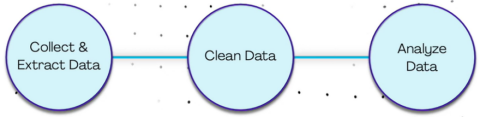
Expensify Alteryx Excel AI
e.g. extract expense slips data input .csv for clean – Analyze Data
7. Measurement Performance Domain
AI-Assisted Project Performance Measurement and Management
The Measurement Performance Domain focuses on understanding project performance and using information to support management decisions.
AI can assist the project manager with project documentation, action tracking, reporting and performance communication.
Microsoft Copilot – Project Charter
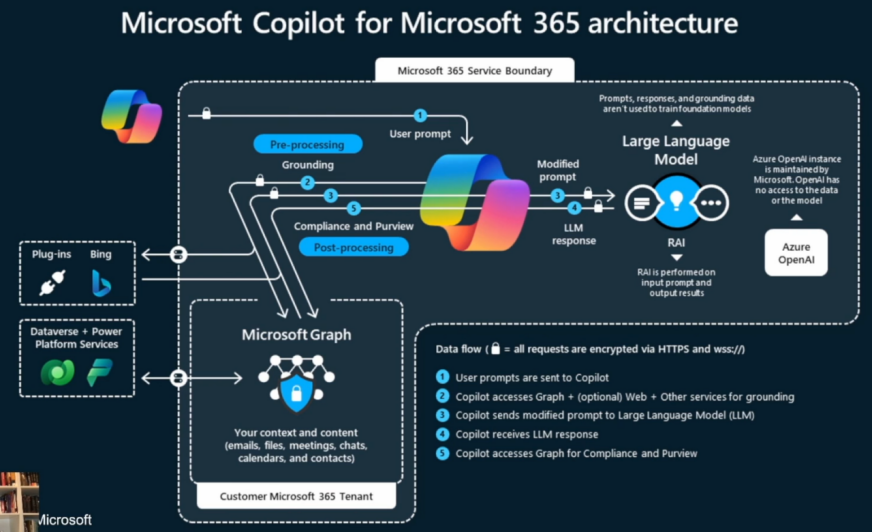
The project manager can use Microsoft Copilot workflow to create a project charter, for example, providing the available project information and use a prompt such as:
“I am a project manager and I have recently been assigned to a new project. Review the attached project information and create a project charter.”
The AI can organise the information into sections such as:
- Project purpose
- Business objectives
- Scope
- Major deliverables
- Stakeholders
- Roles and responsibilities
- Timeline
- Key milestones
- Assumptions
- Constraints
- Risks
- Success criteria
For the example Legacy Employee Onboarding Software Replacement project, Copilot can be asked to finalise the charter and include the timeline, key milestones and responsibilities.
Action Items
Copilot can also help identify action items from project information.
A structured action list might include:
| Action | Owner | Priority | Due Date | Status |
|---|---|---|---|---|
| Confirm requirements | Business Lead | High | 10 Sep | Open |
| Complete system design | Technical Lead | High | 20 Sep | In Progress |
| Prepare test environment | IT Team | Medium | 25 Sep | Open |
This makes project information easier to monitor.
Copilot for Presentations
Once the project charter and performance information have been prepared, Copilot can assist in creating PowerPoint presentation content for management reporting.
The project manager can use the presentation to communicate:
- Project status
- Milestones
- Deliverables
- Issues
- Risks
- Decisions required
- Next steps
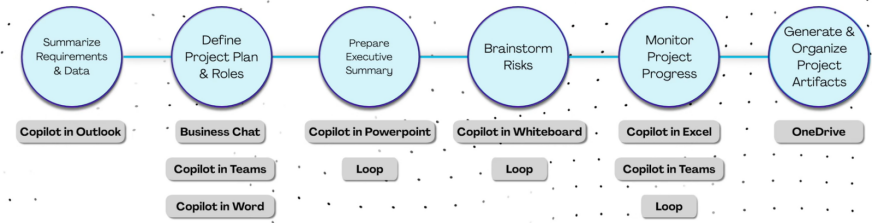
Microsoft Loop – Project Workspace
Microsoft Loop can be used to create a collaborative project workspace.
A project workspace can contain:
- Project documentation
- Task lists
- Project plans
- Meeting information
- Action items
- Project notes
- Communication information
The workflow is described as:
Loop Workspace → Project Folder → Project Files → Task List → Project Plan → Whiteboard → Teams → OneDrive
Microsoft Whiteboard
Whiteboard can be used to create a communication plan in a visual or tabular format.
For example:
| Stakeholder | Information Required | Communication Method | Frequency | Owner |
|---|---|---|---|---|
| Sponsor | Project status | Presentation | Monthly | PM |
| Project Team | Tasks / Issues | Teams | Weekly | PM |
| Customer | Milestones | Meeting | Bi-weekly | PM |
Microsoft Teams
Teams can provide the communication environment for the project team.
It can support:
- Team discussions
- Meetings
- File sharing
- Project announcements
- Collaboration
- Follow-up communication
OneDrive
OneDrive can be used as the central document-storage location for project files.
A structured project folder might contain:
01 Project Charter
02 Requirements
03 Project Plan
04 Meeting Minutes
05 Risks and Issues
06 Reports
07 Testing
08 Project Closure
Project Closure and Lessons Learned
At the end of the project, AI can help the project manager organise project information into a closure report.
Possible sections include:
- Project objectives achieved
- Deliverables completed
- Outstanding items
- Schedule performance
- Budget performance
- Quality performance
- Major issues
- Risk outcomes
- Stakeholder feedback
- Lessons learned
- Recommendations for future projects
The lessons-learned information can then become organisational knowledge for future projects.
8. Uncertainty Performance Domain
AI-Assisted Project Data Synthesis and Dynamic Risk Dashboard
Projects operate in conditions of uncertainty. Risks, assumptions, issues, changing requirements, resource constraints and external events can all affect project outcomes.
AI can help project managers combine information from multiple sources and transform it into a more useful risk-management view.
Step 1 – Gather Project Data
The first step is to collect appropriate project information, such as:
- Risk register
- Issue log
- Project schedule
- Budget information
- Requirements
- Meeting minutes
- Progress reports
- Stakeholder feedback
- External industry information
Step 2 – Clean and Prepare the Data
The original workflow proposes using ChatGPT and Claude to help prepare and synthesise project data.
The AI can assist in:
- Standardising terminology
- Removing duplicate information
- Categorising risks
- Summarising issues
- Identifying relationships between risks and project activities
- Preparing structured datasets
The project manager should verify the data before using it for management decisions.
Step 3 – Create a Dynamic Risk Dashboard
The cleaned data can then be used to create an HTML-based dashboard.
Using HTML and Canvas can create the dashboard. For example, a risk dashboard could contain:
Overall Risk Status
- Number of open risks
- Number of high risks
- Number of medium risks
- Number of low risks
- Risks increasing in severity
- Risks requiring immediate action
It could also provide visual information such as:
- Risk matrix
- Risk trend
- Risk category
- Risk owner
- Risk response status
- Open versus closed risks
A dynamic dashboard has an advantage over a static report because the underlying data can be updated and the visual presentation can reflect the latest information.
Step 4 – Automated Project Reporting
The final stage of the workflow uses ChatGPT with Google Apps Script to automate email distribution.
A possible process is:
Project Data → AI Analysis → Risk Dashboard → PDF Report → Google Drive → Apps Script → Automated Email
The project manager can prepare a PDF report and store it in Google Drive. Google Apps Script can then automate an email containing the report as an attachment or provide access to the relevant report.
This can create a recurring reporting process without requiring the project manager to manually prepare and distribute every report.
Example Automated Risk Reporting Cycle
Daily / Weekly
- Collect latest project information.
- Update the project dataset.
- Clean and prepare the data.
- Analyse risks and issues with AI.
- Update the dashboard.
- Generate the project report.
- Produce PDF output.
- Store the report in Google Drive.
- Automatically distribute the report.
- Project manager reviews significant changes and takes appropriate action.
The key benefit is that AI and automation can reduce the time spent preparing reports, allowing the project manager to focus on interpreting the information and managing the underlying risks.

Conclusion
From AI Tools to an AI-Assisted Project Management Workflow
The examples in this document demonstrate that AI can be applied throughout the project management life cycle rather than being limited to generating text.
The eight Project Performance Domains provide a useful framework for identifying where AI can support project-management activities:
| Project Management Domain | AI / Technology Application | Primary Benefit |
|---|---|---|
| Stakeholder | Meeting summarisation + Make.com | Reduce communication administration |
| Team | Claude + skills analysis | Identify skills gaps |
| Development Approach & Life Cycle | ChatGPT + PMI Infinity + Claude | Requirements traceability and testing |
| Planning | Make.com + RSS feeds | Automated industry intelligence |
| Project Work | ChatGPT + Gamma | Faster presentation development |
| Delivery | Expensify + Alteryx + Excel AI | Data preparation and analysis |
| Measurement | Copilot + Loop + Teams + OneDrive | Performance management and collaboration |
| Uncertainty | ChatGPT + Claude + HTML/Canvas + Apps Script | Risk analysis and automated reporting |
The greatest value of AI in project management is not simply the ability to generate documents. Its greater potential comes from connecting AI tools together into repeatable workflows.
For example:
Capture Information → Clean Data → Analyse Information → Generate Insight → Visualise Results → Communicate → Automate Follow-up
This approach can transform the project manager’s role from spending excessive time on administrative work toward spending more time on leadership, stakeholder engagement, problem solving, risk management and strategic decision-making.
However, AI should remain an assistant to the project manager. Human judgement is still essential for validating requirements, interpreting project information, assessing risks, managing stakeholders and making decisions. Confidential project information should also only be provided to AI services in accordance with the organisation’s information-security and data-protection policies.
The objective is therefore not “AI replaces the Project Manager”, but:
“AI augments the Project Manager.”
By combining project-management expertise with AI, automation, data analysis and visualisation, project managers can create a more efficient, data-driven and responsive project-management environment.