What is “China Manufacturing 2025” ?

industiral-4.0
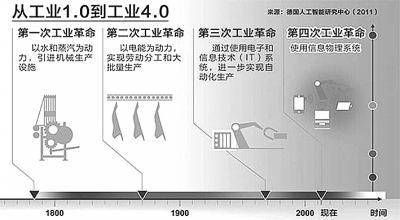
Industry 4.0是实体物理世界与虚拟网络世界融合的时代。但德国业界对Industry 4.0的响应者却不多,原因之一是所谓的虚拟网络-实体物理系统(Cyber-Physical System,CPS)融合的主要思想,美国早在若干年前就已提出。未来 10 年,基于信息物理系统(Cyber-PhysicalSystem,CPS)的智能化,将使人类步入以智能制造为主导的第四次工业革命。产品全生命周期、全制造流程数字化以及基于信息通信技术的模块集成,将形成一种高度灵活、个性化、数字化的产品与服务新生产模式。

013 年 12 月 12 日,美国白宫召开了第一次CPS成员会议。李杰教授作为专家组成员参加了会议。他们要讨论的事情,与德国的Industry 4.0其实是一样的内容。虽然德国先提出了概念,但他们刚刚起步、着手转型,而美国一直在做以CPS为概念的先进制造。或许正是这方面的原因,德国也于2013年10月邀请李杰教授前往分享他们在美国的成功案例。

对于 CPS 的概念,李杰教授认为可以用日常生活中常见事物来解释。正如人们在 facebook 里建立的各种关系,在物理世界里是不可见的,却可以得出这个人的生活社群、行为习惯、过往经历等等。同样,任何产品都有虚拟和实体两个世界(譬如:苹果手机是实体,但APP是虚体),如何将虚拟世界里的关系透明化,正是Industry 4.0时代需要做的。未来产品(譬如:机床、飞机、汽车、等等)都应该会有实与虚的价值接合。这样的道理,是德国人提出概念的依据,但是李杰教授团队在美国已经自2001年开始积累大量和工业界成功合作建立的案例。

需要强调的是,德国提出的Industry 4.0和美国的CPS,核心要义都是制造业基于数据分析的转型。

结语

德国制造业是世界上最具竞争力的制造业之一,在全球制造装备领域拥有领头羊的地位。这在很大程度上源于德国专注于创新工业科技产品的科研和开发,以及对复杂工业过程的管理。

德国拥有强大的设备和车间制造工业基础,在世界 “信息技术” 领域拥有很高的能力水平,在 “嵌入式系统” 和 “自动化工程” 方面也有很专业的技术,这些因素共同奠定了德国在制造工程工业上的领军地位。通过 “Industry 4.0” 战略的实施,将使德国成为新一代工业生产技术(即: 信息物理系统)的供应国和主导市场,会使德国在继续保持国内制造业发展的前提下再次提升它的全球竞争力。

China Manufacturing 2025

中国国务院于2015年5月8日由李克强总理签批,公布了“China Manufacturing 2025”,这是是中国版的“Industry 4.0”规划。

“China Manufacturing 2025”规划提出了中国制造强国建设三个十年的“三步走”战略,是第一个十年行动纲领。

China Manufacturing 2025
指导思想

以促进制造业创新发展为主题,以提质增效为中心,以加快新一代信息技术与制造业深度融合为主线,以推进智能制造为主攻方向,以满足经济社会发展和国防建设对重大技术装备的需求为目标,强化工业基础能力,提高综合集成水平,完善多层次多类型人才培养体系,促进产业转型升级,培育有中国特色的制造文化,实现制造业由大变强的历史跨越。

基本方针

创新驱动、质量为先、绿色发展、结构优化、人才为本。

战略目标

力争用十年时间,迈入制造强国行列;到2035年,我国制造业整体达到世界制造强国阵营中等水平;新中国成立一百年时,制造业大国地位更加巩固,综合实力进入世界制造强国前列。

Info Source: http://www.digitser.net/en-US/enterprise_culture/pro_advice/pro_advice_004.html

What is Industry 4.0 ?

Industrial Applications« BACK TO INDUSTRIAL APPLICATIONS
Industry 4.0 – What’s That About?
By John Donovan for Mouser Electronics

First we had inflection points; then paradigm shifts were all the rage. Now we are hearing about a new Industrial Revolution – Industry 4.0. According to its proponents it is a new method of production that is creating a fourth Industrial Revolution. Really? What’s that about?

To back up a bit – actually about 250 years – James Watt’s improvements to the Newcomen steam engine in the late 18th century kick started the First Industrial Revolution. Watt did not invent the steam engine, but his numerous innovations increased the productivity of the textile industry by three orders of magnitude. Mechanized factories had arrived.

The Second Industrial Revolution dates from Henry Ford’s introduction of the assembly line in 1913, which resulted in a huge increase in production of Model T’s – over 15 million by the time they were discontinued in 1927. Soon every other manufacturing industry was using assembly lines to increase efficiency and productivity as well as cut costs. The days of mass production had arrived.

The Third Industrial Revolution resulted from the introduction of the computer onto the factory floor in the 1970s, giving rise to the automated assembly line. For mechanical work, computers increasingly replaced humans, another major inflection point in productivity. Today, seemingly every manufacturing function that can be automated has been. Highly automated factories turn out the complex consumer electronics products that we take for granted at prices we can afford.

Industry 4.0
But wait – there is more. The vision of Industry 4.0 is for “cyber-physical production systems” in which sensor-laden “smart products” tell machines how they should be processed; processes would now govern themselves in a decentralized, modular system. Smart embedded devices start working together wirelessly either directly or via either the Internet ‘cloud’ – the Internet of Things (IoT) – to once again revolutionize production. Rigid, centralized factory control systems give way to decentralized intelligence as machine-to-machine (M2M) communication hits the shop floor. This is the Industry 4.0 vision of the Fourth Industrial Revolution.

The concept of cyber-physical systems (CPS) was first defined by Dr. James Truchard, CEO of National Instruments, in 2006, based on a virtual representation of a manufacturing process in software. In January 2012, the German Federal Ministry of Education and Research set up a working group to draft comprehensive strategic recommendations for implementing “Industry 4.0”, a term coined by the group. The Industry 4.0 Project is now part of the German government’s official High-Tech Strategy, which it is actively pursuing in conjunction with private sector partners. Discussions about Industry 4.0 took center stage at April’s Hannover Fair, which is why we are suddenly hearing about it.

Industry 4.0 is currently more of a vision than a reality, but it is one with potentially far reaching consequences; and the concept continues to evolve as people think of innovative ways to implement it. However, some things are already clear:

Sensors will be involved at every stage of the manufacturing process, providing the raw data as well as the feedback that is required by control systems.
Industrial control systems will become far more complex and widely distributed, enabling flexible, fine-grained process control.
RF technologies will tie together the distributed control modules in wireless mesh networks, enabling systems to be reconfigured on the fly in a way that is not possible with hard-wired, centralized control systems.
Programmable logic will become increasingly important since it will be impossible to anticipate all the environmental changes to which control systems will need to dynamically respond.
Smart, connected embedded devices will be everywhere, and designing and programming them will become that much more challenging – not to mention interesting and rewarding.
Most of the techniques and technologies needed to implement Industry 4.0 exist today. For example, the radios, sensors, and GPS modules used for asset tracking could just as easily track circuit board assets around the factory floor as they evolve from slabs of FR4 into server blades. The Industry 4.0 spin is that instead of simply attaching an RFID tag and passively tracking the PCB down a linear assembly line, the pick-and-place module could alert inventory when it was running short of memory chips. If the response was that they could not be restocked in time, then all the relevant machines in the entire factory – from the cutting machines and drill presses right through to the systems assembly robots – would reprogram themselves to begin producing the next product for which all parts were in stock, drawing them down from remote inventory as needed, automatically delivered to the right machine just-in-time. Meanwhile, second-source suppliers would be alerted and their assets automatically reconfigured accordingly. The result would be an enormous savings in time and cost versus what even current heavily automated factories can deliver.

Revolution or Evolution?
Earlier Industrial Revolutions did not happen overnight, nor were they recognized as such at the time. For its part, Industry 4.0 may or may not be recognized as revolutionary – rather than evolutionary – in retrospect. Yet it is a natural consequence of M2M communication further automating the factory floor, and like its predecessors it should result in more plentiful, lower cost products which is a net benefit for all concerned.

Whether revolution or evolution, industrial production is about to become a lot more efficient. Stay tuned for more exciting developments. Better yet, get involved in making them happen.

Info Source: http://www.mouser.cn/applications/industry-40/

Reference Info/Link for Python’s Django Development

A great document for more complex installations—those that host multiple Django Web sites (projects) using only one instance of Apache—can be found at –>
http://forum.webfaction.com/ -> search for ‘Django’

You can find out more about some of the possible Web server arrangements at –>
http://code.djangoproject.com/wiki/ServerArrangements.

More about Django and database installation at –>
http://docs.djangoproject.com/en/dev/topics/install/#database-installation.

You can download Django-nonrel from –> http://www.allbuttonspressed.com/projects/django-nonrel
followed by one of the adapters, –> https://github.com/FlaPer87/django-mongodb-engine (Django with MongoDB), or –> http://www.allbuttonspressed.com/projects/djangoappengine (Django on Google App Engine’s datastore).

Because Django-nonrel is (at the time of this writing) a fork of Django, you can just install it instead of a stock
Django package. The main reason for doing that is because you want to
use the same version for both development and production. As stated at
–> http://www.allbuttonspressed.com/projects/django-nonrel, “the modifications to Django are minimal (maybe less than 100 lines).” Django-nonrel is available as a Zip file,

You can find all of the runserver options at –>
http://docs.djangoproject.com/en/dev/ref/django-admin/#django-admin-runserver.

To learn more about templates and tags, check out the official documents page at –> http://docs.djangoproject.com/en/dev/ref/templates/api/
#basics.

To read more about using render_to_response(), check out these pages from the official documentation: –>
• http://docs.djangoproject.com/en/dev/intro/tutorial03/#ashortcut-render-to-response
• http://docs.djangoproject.com/en/dev/topics/http/shortcuts/#render-to-response

To find out when a QuerySet is evaluated, check out the official
documentation at –> http://docs.djangoproject.com/en/dev/ref/models/querysets/.

Explanations of CSRF are beyond the scope of this book, but you can read more about them here: –>
• http://docs.djangoproject.com/en/dev/intro/tutorial04/#writea-simple-form
• http://docs.djangoproject.com/en/dev/ref/contrib/csrf/

To learn more about testing in Django, check out the documentation at –>
http://docs. djangoproject.com/en/dev/topics/testing.

You can read more about how OAuthworks at the following locations: –>
http://hueniverse.com/oauth
http://oauth.net
http://en.wikipedia.org/wiki/Oauth

more details on this at –>
http://docs.djangoproject.com/en/dev/howto/deployment/modwsgi/#serving-the-admin-files

Twitter maintains a list of the most popular ones at –>
http://dev.twitter.com/pages/libraries#python.

To find out more about Django’s authentication system, check the documentation at –>
https://docs.djangoproject.com/en/dev/topics/auth/.

Steps to Apply US Nonimmigrant VISA in Hong Kong

Because of business trip to US, I applied an US VISA recently, and found it was quite trouble and time consuming. I need to fill-in application form on-line and go to US consulate personally. I totally spent two to three weeks to get an US VISA. The following is the steps to apply US VISA for your reference.

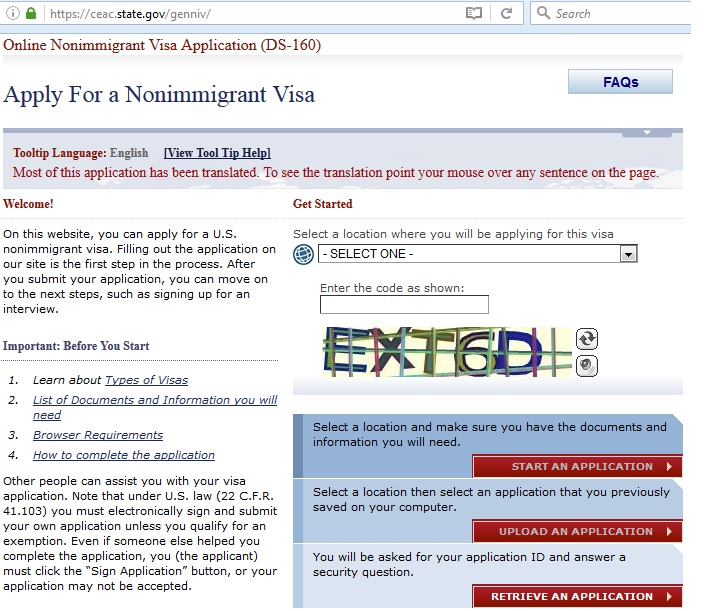
1. Fill-in NonImmigrant Visa Application Form (DS-160) online with below link

https://ceac.state.gov/genniv/

US-VISA-4

(Be patience because you need to take at least 15 minutes or more to complete all, and you should print its confirmation letter to show to US consulate officer.)

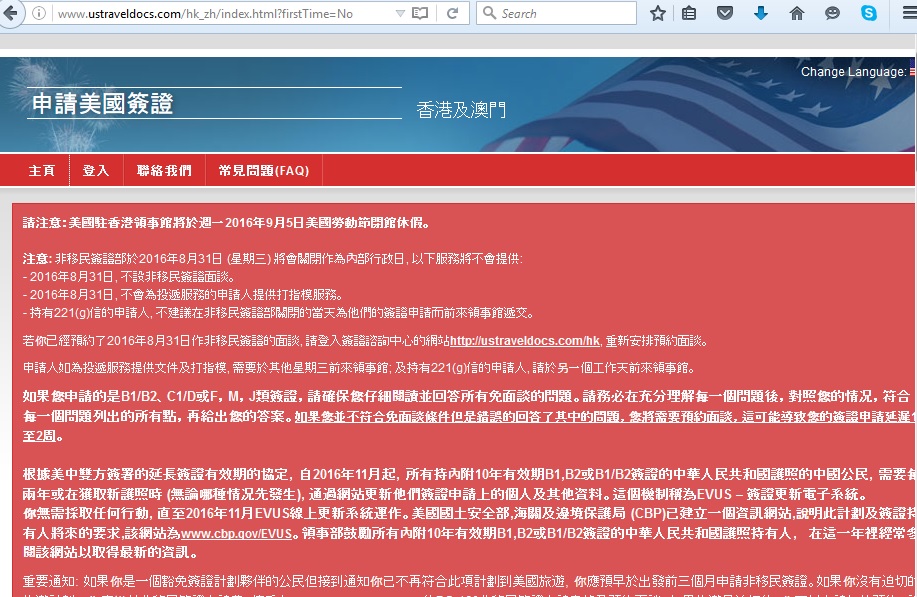
2. Create an account to apply US Visa from its web site below:

http://www.ustraveldocs.com/hk_zh/index.html?firstTime=No

US-VISA-1

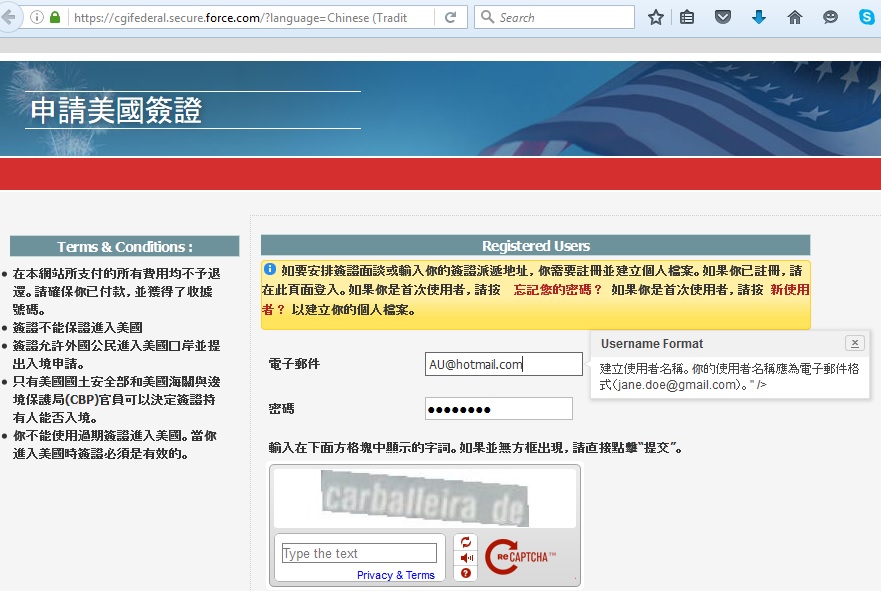
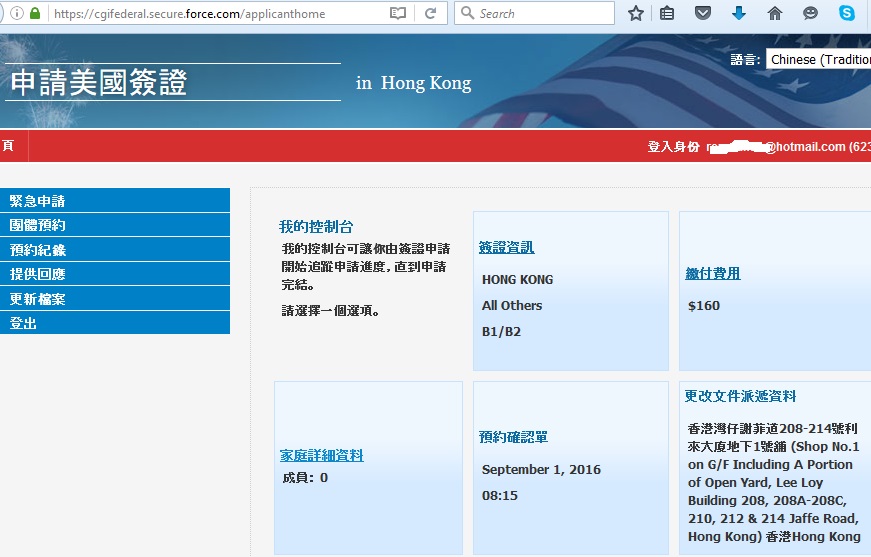
3. Logon to US Visa web site for fill-in detail and making appointment as below link:

https://cgifederal.secure.force.com/applicanthome

US-VISA-2

4. Complete all the detail in the web site and schedule your interview appointment

US-VISA-3

4. Go to US consulate for finger-print and interview at your schedule time which you should not late than an hour.

It is not allow to bring food and drink to the consulate.

I just took 2 minutes with 5 simple questions to complete my interview, but I saw someone took more than 5 minutes for the interview, which was depend on your luck.

The fast way to get VISA delivery is to collect in Wai Chai, which need to take 2 business days. The pickup time in Wai Chai is 9:00-16:00 Mon-Sat. If you select mail delivery, it will take 5 business days.

The address of US Consulate General in Hong Kong is 26 Garden Road, Central, and their phone number is (852) 2423 9011. However, their office phone is always unreachable. For any enquiry, you can call their another hot line (852) 2808-4666.

IT人在工廠日記 – 大陸終於有第一次的台風假期

大陸終於有第一次的台風假期,全廣東省於2016年8月2日放假一天,它通過電訊商發放資訊,認真是一進步。

中央氣象台消息,台風“妮妲”於2016年8月2日淩晨到上午在廣東汕尾到陽江一帶沿海登陸,預計登陸強度為台風級或強台風級,風速可達每秒40米至48米,風力可達13級至15級。受“妮妲”影響,8月1日至4日,華南大部、貴州南部、雲南東南部等地自東向西先後有暴雨到大暴雨,珠三角附近局地有特大暴雨。

How to setup python 2.7 and 3.5 under same computer

Introduction

Conda treats Python the same as any other package, so it’s very easy to manage and update multiple python installations under one computer. For instance, if you want to install different version of python in the same window env but without wipe out the current version of python, you can create and activate a new virtual environment with specific name and install your required version of Python as follows instruction.

Install Python 3.5 under Python 2.7

1. install new python with command:       $ conda create -n py35 python=3.5 anaconda
2. activate the new setup python with command:    $ activate py35
3. deactivate with command: $ deactivate

4. Remove the created env: $ conda remove –name py35 –all

Install Python 2.7 under Python 3.5

1. install new python with command:       $ conda create -n py27 python=2.7 anaconda
2. activate the new setup python with command:    $ activate py27
3. deactivate with command: $ deactivate

Screen Dump of Deinstallation and Installation as below:

C:Usergoldmanau>conda create -n py27 python=2.7 anaconda
Fetching package metadata: ….
Solving package specifications: ………………………….
Package plan for installation in environment C:UsersgoldmanauAppDataLocalCo
ntinuumAnaconda3envspy27:The following packages will be downloaded:

package                    |            build
—————————|—————–
pandas-0.18.1              |      np111py27_0         7.0 MB  defaults
pickleshare-0.7.2          |           py27_0           9 KB  defaults
pytables-3.2.2             |      np111py27_4         1.5 MB  defaults
scikit-learn-0.17.1        |      np111py27_1         3.5 MB  defaults
sphinx-1.4.1               |           py27_0         1.3 MB  defaults
tornado-4.3                |           py27_1         543 KB  defaults
anaconda-navigator-1.2.1   |           py27_0         1.3 MB  defaults
bokeh-0.11.1               |           py27_0         3.1 MB  defaults
flask-cors-2.1.2           |           py27_0          15 KB  defaults
ipython-4.2.0              |           py27_0         981 KB  defaults
jupyter_client-4.3.0       |           py27_0         138 KB  defaults
nbformat-4.0.1             |           py27_0         155 KB  defaults
odo-0.5.0                  |           py27_0         216 KB  defaults
pyopenssl-0.16.0           |           py27_0          66 KB  defaults
scikit-image-0.12.3        |      np111py27_1        17.6 MB  defaults
sockjs-tornado-1.0.3       |           py27_0          32 KB  defaults
statsmodels-0.6.1          |      np111py27_1         4.6 MB  defaults
dask-0.10.0                |           py27_0         525 KB  defaults
ipykernel-4.3.1            |           py27_0         117 KB  defaults
nbconvert-4.2.0            |           py27_0         354 KB  defaults
jupyter_console-4.1.1      |           py27_0          65 KB  defaults
notebook-4.2.1             |           py27_0         5.2 MB  defaults
qtconsole-4.2.1            |           py27_0         203 KB  defaults
ipywidgets-4.1.1           |           py27_0          98 KB  defaults
nb_anacondacloud-1.1.0     |           py27_0          20 KB  defaults
nb_conda_kernels-1.0.3     |           py27_0          28 KB  defaults
nbpresent-3.0.2            |           py27_0         512 KB  defaults
spyder-2.3.9               |           py27_0         2.1 MB  defaults
jupyter-1.0.0              |           py27_3           3 KB  defaults
nb_conda-1.1.0             |           py27_0          25 KB  defaults
_nb_ext_conf-0.2.0         |           py27_0          912 B  defaults
anaconda-4.1.0             |      np111py27_0          16 KB  defaults
————————————————————
Total:        51.2 MB

The following NEW packages will be INSTALLED:

_nb_ext_conf:       0.2.0-py27_0       defaults
alabaster:          0.7.8-py27_0       defaults
anaconda:           4.1.0-np111py27_0  defaults
anaconda-client:    1.4.0-py27_0       defaults
anaconda-navigator: 1.2.1-py27_0       defaults
argcomplete:        1.0.0-py27_1       defaults
astropy:            1.2.1-np111py27_0  defaults
babel:              2.3.3-py27_0       defaults
backports:          1.0-py27_0         defaults
backports_abc:      0.4-py27_0         defaults
beautifulsoup4:     4.4.1-py27_0       defaults
bitarray:           0.8.1-py27_1       defaults
bokeh:              0.11.1-py27_0      defaults
boto:               2.40.0-py27_0      defaults
bottleneck:         1.0.0-np111py27_1  defaults
bzip2:              1.0.6-vc9_3        defaults [vc9]
cdecimal:           2.3-py27_2         defaults
cffi:               1.6.0-py27_0       defaults
chest:              0.2.3-py27_0       defaults
click:              6.6-py27_0         defaults
cloudpickle:        0.2.1-py27_0       defaults
clyent:             1.2.2-py27_0       defaults
colorama:           0.3.7-py27_0       defaults
comtypes:           1.1.2-py27_0       defaults
configobj:          5.0.6-py27_0       defaults
configparser:       3.5.0b2-py27_1     defaults
console_shortcut:   0.1.1-py27_1       defaults
contextlib2:        0.5.3-py27_0       defaults
cryptography:       1.4-py27_0         defaults
curl:               7.49.0-vc9_0       defaults [vc9]
cycler:             0.10.0-py27_0      defaults
cython:             0.24-py27_0        defaults
cytoolz:            0.8.0-py27_0       defaults
dask:               0.10.0-py27_0      defaults
datashape:          0.5.2-py27_0       defaults
decorator:          4.0.10-py27_0      defaults
dill:               0.2.5-py27_0       defaults
docutils:           0.12-py27_2        defaults
entrypoints:        0.2.2-py27_0       defaults
enum34:             1.1.6-py27_0       defaults
et_xmlfile:         1.0.1-py27_0       defaults
fastcache:          1.0.2-py27_1       defaults
flask:              0.11.1-py27_0      defaults
flask-cors:         2.1.2-py27_0       defaults
freetype:           2.5.5-vc9_1        defaults [vc9]
funcsigs:           1.0.2-py27_0       defaults
functools32:        3.2.3.2-py27_0     defaults
futures:            3.0.5-py27_0       defaults
get_terminal_size:  1.0.0-py27_0       defaults
gevent:             1.1.1-py27_0       defaults
greenlet:           0.4.10-py27_0      defaults
grin:               1.2.1-py27_3       defaults
h5py:               2.6.0-np111py27_0  defaults
hdf5:               1.8.15.1-vc9_4     defaults [vc9]
heapdict:           1.0.0-py27_1       defaults
idna:               2.1-py27_0         defaults
imagesize:          0.7.1-py27_0       defaults
ipaddress:          1.0.16-py27_0      defaults
ipykernel:          4.3.1-py27_0       defaults
ipython:            4.2.0-py27_0       defaults
ipython_genutils:   0.1.0-py27_0       defaults
ipywidgets:         4.1.1-py27_0       defaults
itsdangerous:       0.24-py27_0        defaults
jdcal:              1.2-py27_1         defaults
jedi:               0.9.0-py27_1       defaults
jinja2:             2.8-py27_1         defaults
jpeg:               8d-vc9_0           defaults [vc9]
jsonschema:         2.5.1-py27_0       defaults
jupyter:            1.0.0-py27_3       defaults
jupyter_client:     4.3.0-py27_0       defaults
jupyter_console:    4.1.1-py27_0       defaults
jupyter_core:       4.1.0-py27_0       defaults
libpng:             1.6.22-vc9_0       defaults [vc9]
libtiff:            4.0.6-vc9_2        defaults [vc9]
llvmlite:           0.11.0-py27_0      defaults
locket:             0.2.0-py27_1       defaults
lxml:               3.6.0-py27_0       defaults
markupsafe:         0.23-py27_2        defaults
matplotlib:         1.5.1-np111py27_0  defaults
menuinst:           1.4.1-py27_0       defaults
mistune:            0.7.2-py27_0       defaults
mkl:                11.3.3-1           defaults
mkl-service:        1.1.2-py27_2       defaults
mpmath:             0.19-py27_1        defaults
multipledispatch:   0.4.8-py27_0       defaults
nb_anacondacloud:   1.1.0-py27_0       defaults
nb_conda:           1.1.0-py27_0       defaults
nb_conda_kernels:   1.0.3-py27_0       defaults
nbconvert:          4.2.0-py27_0       defaults
nbformat:           4.0.1-py27_0       defaults
nbpresent:          3.0.2-py27_0       defaults
networkx:           1.11-py27_0        defaults
nltk:               3.2.1-py27_0       defaults
nose:               1.3.7-py27_1       defaults
notebook:           4.2.1-py27_0       defaults
numba:              0.26.0-np111py27_0 defaults
numexpr:            2.6.0-np111py27_0  defaults
numpy:              1.11.0-py27_2      defaults
odo:                0.5.0-py27_0       defaults
openpyxl:           2.3.2-py27_0       defaults
openssl:            1.0.2h-vc9_0       defaults [vc9]
pandas:             0.18.1-np111py27_0 defaults
partd:              0.3.4-py27_0       defaults
path.py:            8.2.1-py27_0       defaults
pathlib2:           2.1.0-py27_0       defaults
patsy:              0.4.1-py27_0       defaults
pep8:               1.7.0-py27_0       defaults
pickleshare:        0.7.2-py27_0       defaults
pillow:             3.2.0-py27_1       defaults
pip:                8.1.2-py27_0       defaults
ply:                3.8-py27_0         defaults
psutil:             4.3.0-py27_0       defaults
py:                 1.4.31-py27_0      defaults
pyasn1:             0.1.9-py27_0       defaults
pycosat:            0.6.1-py27_1       defaults
pycparser:          2.14-py27_1        defaults
pycrypto:           2.6.1-py27_4       defaults
pycurl:             7.43.0-py27_0      defaults
pyflakes:           1.2.3-py27_0       defaults
pygments:           2.1.3-py27_0       defaults
pyopenssl:          0.16.0-py27_0      defaults
pyparsing:          2.1.4-py27_0       defaults
pyqt:               4.11.4-py27_6      defaults
pyreadline:         2.1-py27_0         defaults
pytables:           3.2.2-np111py27_4  defaults
pytest:             2.9.2-py27_0       defaults
python:             2.7.11-5           defaults
python-dateutil:    2.5.3-py27_0       defaults
pytz:               2016.4-py27_0      defaults
pywin32:            220-py27_1         defaults
pyyaml:             3.11-py27_4        defaults
pyzmq:              15.2.0-py27_0      defaults
qt:                 4.8.7-vc9_8        defaults [vc9]
qtconsole:          4.2.1-py27_0       defaults
qtpy:               1.0.2-py27_0       defaults
requests:           2.10.0-py27_0      defaults
rope:               0.9.4-py27_1       defaults
ruamel_yaml:        0.11.7-py27_0      defaults
scikit-image:       0.12.3-np111py27_1 defaults
scikit-learn:       0.17.1-np111py27_1 defaults
scipy:              0.17.1-np111py27_1 defaults
setuptools:         23.0.0-py27_0      defaults
simplegeneric:      0.8.1-py27_1       defaults
singledispatch:     3.4.0.3-py27_0     defaults
sip:                4.16.9-py27_2      defaults
six:                1.10.0-py27_0      defaults
snowballstemmer:    1.2.1-py27_0       defaults
sockjs-tornado:     1.0.3-py27_0       defaults
sphinx:             1.4.1-py27_0       defaults
sphinx_rtd_theme:   0.1.9-py27_0       defaults
spyder:             2.3.9-py27_0       defaults
sqlalchemy:         1.0.13-py27_0      defaults
ssl_match_hostname: 3.4.0.2-py27_1     defaults
statsmodels:        0.6.1-np111py27_1  defaults
sympy:              1.0-py27_0         defaults
tk:                 8.5.18-vc9_0       defaults [vc9]
toolz:              0.8.0-py27_0       defaults
tornado:            4.3-py27_1         defaults
traitlets:          4.2.1-py27_0       defaults
unicodecsv:         0.14.1-py27_0      defaults
vs2008_runtime:     9.00.30729.1-2     defaults
werkzeug:           0.11.10-py27_0     defaults
wheel:              0.29.0-py27_0      defaults
xlrd:               1.0.0-py27_0       defaults
xlsxwriter:         0.9.2-py27_0       defaults
xlwings:            0.7.2-py27_0       defaults
xlwt:               1.1.2-py27_0       defaults
zlib:               1.2.8-vc9_3        defaults [vc9]

Proceed ([y]/n)? y

Fetching packages …
pandas-0.18.1- 100% |###############################| Time: 0:01:17  94.50 kB/s
pickleshare-0. 100% |###############################| Time: 0:00:00   1.48 MB/s
pytables-3.2.2 100% |###############################| Time: 0:00:15 101.08 kB/s
scikit-learn-0 100% |###############################| Time: 0:00:35 103.10 kB/s
sphinx-1.4.1-p 100% |###############################| Time: 0:00:15  88.76 kB/s
tornado-4.3-py 100% |###############################| Time: 0:00:04 112.43 kB/s
anaconda-navig 100% |###############################| Time: 0:00:13 103.67 kB/s
bokeh-0.11.1-p 100% |###############################| Time: 0:00:38  83.75 kB/s
flask-cors-2.1 100% |###############################| Time: 0:00:00  33.06 kB/s
ipython-4.2.0- 100% |###############################| Time: 0:00:09 106.52 kB/s
jupyter_client 100% |###############################| Time: 0:00:02  61.09 kB/s
nbformat-4.0.1 100% |###############################| Time: 0:00:01  89.78 kB/s
odo-0.5.0-py27 100% |###############################| Time: 0:00:02  76.72 kB/s
pyopenssl-0.16 100% |###############################| Time: 0:00:01  55.44 kB/s
scikit-image-0 100% |###############################| Time: 0:03:35  85.86 kB/s
sockjs-tornado 100% |###############################| Time: 0:00:00  66.93 kB/s
statsmodels-0. 100% |###############################| Time: 0:00:51  92.79 kB/s
dask-0.10.0-py 100% |###############################| Time: 0:00:06  84.35 kB/s
ipykernel-4.3. 100% |###############################| Time: 0:00:01  66.01 kB/s
nbconvert-4.2. 100% |###############################| Time: 0:00:05  68.28 kB/s
jupyter_consol 100% |###############################| Time: 0:00:01  45.59 kB/s
notebook-4.2.1 100% |###############################| Time: 0:00:53 100.82 kB/s
qtconsole-4.2. 100% |###############################| Time: 0:00:02  72.55 kB/s
ipywidgets-4.1 100% |###############################| Time: 0:00:01  86.14 kB/s
nb_anacondaclo 100% |###############################| Time: 0:00:00  37.88 kB/s
nb_conda_kerne 100% |###############################| Time: 0:00:00  67.10 kB/s
nbpresent-3.0. 100% |###############################| Time: 0:00:04 112.47 kB/s
spyder-2.3.9-p 100% |###############################| Time: 0:00:26  81.65 kB/s
jupyter-1.0.0- 100% |###############################| Time: 0:00:00   0.00  B/s
nb_conda-1.1.0 100% |###############################| Time: 0:00:00  61.82 kB/s
_nb_ext_conf-0 100% |###############################| Time: 0:00:00   0.00  B/s
anaconda-4.1.0 100% |###############################| Time: 0:00:00  40.15 kB/s
Extracting packages …
[      COMPLETE      ]|##################################################| 100%
Linking packages …
1 file(s) copied.####################                            |  44%
[      COMPLETE      ]|##################################################| 100%
#
# To activate this environment, use:
# > activate py27

C:Usersgoldmanau>conda remove  –name py27 –all
Fetching package metadata: ….Package plan for package removal in environment C:UsersgoldmanauAppDataLocal
ContinuumAnaconda3envspy27:

The following packages will be REMOVED:

menuinst: 1.4.1-py27_0 defaults

Proceed ([y]/n)? y


Reference Doc Link

http://conda.pydata.org/docs/py2or3.html

网络安全稽核工作(Network Security Auditing Work)

安全稽核工作

1.定期对公司系统软件进行渗透测试模拟攻击,及时发现系统安全漏洞,反馈给相关部门
2.利用自主开发的epa软件时行网络监控,对网络违规行为及时制止(如:私自安装与工作无关聊天软件等)
3.对外发邮件进行稽核,特别是外发apk是否含有公司机密文件
4.物理环境稽核,如:私自搭建wifi,各种网络设备规范连接等
5.权限与安全意识稽核,如:账号权限与使用,违规操作等
6.撰写公司各种安全条例规范及安全策略

网络维护,日常管理,调查安全事件,支持及参与公司系统开发,维护及应用;对系统/程序进行测试,以确保整体系统的高品质运作;支持系统的实施及支援;统整有关系统文档

Installation of an Open Source Prometeo-ERP System

Introduction

Although Prometeo-ERP System was a phase-out project for any further development, its follow-up project was Django-ERP. However, Django-ERP is still under development, Its function is not ready, and most features are not ready for public use at this moment. Then, I step back to continue to test Prometeo-ERP System. Prometeo-ERP has already provide many useful features, its public release free version had the following features:

  • Authentication & row-level permission system
  • Notification system
  • Custom widgets & dashboards
  • Taxonomy system
  • File browsing
  • Event calendar
  • User tasks & timesheets
  • CRM (Customer Relationship Management)
  • Products management
  • Stock management
  • Human resources management
  • Sales management
  • Project management
  • Knowledge management
  • DMS (Document Management System)

I installed the Prometeo-ERP system to my Raspberry Pi machine, i.e. free OS, free program tools, free application tools, … Great. It is still worth to study it, and I will show the installation installation in the following

Installation Steps:

1. Checkout sources from the GIT repository:

https://code.google.com/archive/p/prometeo-erp/

2. Follow the instructions in the README file as reference.

2.1 PREREQUISITES

Make sure you have the following prerequisites installed:

* python >= 2.6 (or 2.7 the public one)

$ pip install python==2.7

* pytz >= 2011h (required)
$ pip install pytz==2011h

* python-markdown >= 2.0 (required)
$ pip install markdown

* xhtml2pdf >= 0.0.3 (required)
$ pip install xhtml2pdf==0.0.3

* icalendar >= 2.2 (required)
$ pip install icalendar==2.2

* django >= 1.3.1 (required)
$ pip install django==1.3.1

* south >= 0.7.3 (optional)
$ pip install south

2.2 INSTALLATION
1. Rename the download folder to “prometeo” (It is necessary).

2. cp settings/base.py.tmpl settings/base.py, and edit several statement as below:

$ vi settings/base.py
….

ADMINS = (
# (‘Goldman’, ‘goldman.au168@gmail.com’),
)

MANAGERS = ADMINS

DATABASES = {
default’: {
‘ENGINE’: ‘django.db.backends.sqlite3’, # Add ‘postgresql_psycopg2’, ‘postgresql’, ‘mysql’, ‘sqlite3’ or ‘oracle’.
‘NAME’: ‘erp.db’, # Or path to database file if using sqlite3.
‘USER’: ”, # Not used with sqlite3.
‘PASSWORD’: ”, # Not used with sqlite3.
‘HOST’: ”, # Set to empty string for localhost. Not used with sqlite3.
‘PORT’: ”, # Set to empty string for default. Not used with sqlite3.
}

}

LANGUAGE_CODE = ‘en-us’

# List of installed applications.
INSTALLED_APPS = (
‘django.contrib.auth’,
‘django.contrib.contenttypes’,
‘django.contrib.sessions’,
‘django.contrib.sites’,
‘django.contrib.messages’,
‘django.contrib.admin’,
‘django.contrib.admindocs’,
‘django.contrib.comments’,
‘django.contrib.markup’,
‘django.contrib.redirects’,
‘django.contrib.staticfiles’,

#’south’,

‘prometeo.core’,
‘prometeo.core.filebrowser’,
‘prometeo.core.widgets’,
‘prometeo.core.menus’,
‘prometeo.core.taxonomy’,
‘prometeo.core.auth’,
‘prometeo.core.registration’,
‘prometeo.core.notifications’,
‘prometeo.core.calendar’,

‘prometeo.todo’,
‘prometeo.addressing’,
‘prometeo.partners’,
‘prometeo.documents’,
‘prometeo.products’,
‘prometeo.stock’,
‘prometeo.hr’,
‘prometeo.sales’,
‘prometeo.projects’,
‘prometeo.knowledge’,
)

3. It’s time to create the DB schema

$ python manage.py syncdb

4. Start the server:

$ python manage.py runserver

5. Test the application via link http://localhost:8000 as screen dump below:

prometeo-system


Setup Raspberry pi Car camera with Android phone WiFi

Introduction

Raspberry Pi can be widely used for Car computer with many features, such as plays DVDs, GPS, displays TV, Bluetooth (phone calls + music), MP3/MPEG4 player, CD/radio, car camera, reversing camera (comes on automatically when I put the car in reverse gear), etc. This week, I test raspberry pi to connect to android phone’s wireless hotpot, and setup camera and display feature as below. It is interesting.

Connect Raspberry Pi to an Android phone’s camera

Step 1. Install Pi Camera Application in Android Phone, which you can find many from Google Play Store as below screen:

ipcam-app

Step 2. Turn on the Android Phone’s Camera Application and active its web server feature, then it will display an ip address for your external browse connection.

Step 3. Turn on the Android Phone’s wireless sharing hotpot feature, then the ip address will be refresh to its own phone address for your external connection as below:

Step 4. Connect the Raspberry Pi to Android Phone Open the browser in your Raspberry Pi, and type in the ip address, then it will display the camera as below:

ipcam-display

Screen Dump of Another Scene of Camera and Display as below two pictures:

cam-phone-display

cam-pi-diaplay


Display Raspberry Pi Camera to Android phone

Step 1. Install Raspberry Pi Camera and vlc software as describe in my previous post “Installation of Raspberry Pi Camera

Step 2. Start the video streaming function with command:

$ raspivid -w 640 -h 480 -o – -t 9999999 |cvlc -vvv stream:///dev/stdin –sout ‘#standard{access=http,mux=ts,dst=:8554}’ :demux=h264

Step 3. We can connect via browser with link http://ip-address:8554/.

Bonus:

We can also use VNC to connect Raspberry Pi from Android Phone, provided that you start the VNC server function (as described in my previous post “Installation Raspberry Pi” Step 6, and then install VNC app from Google Play Store, and start VNC connection in Andriod Phone as below:

VNC-1                   VNC-2