List of Hong Kong Government Fund Sponsor for SME

OVERSEAS MARKET PROMOTION 海外市場:

1.SME Export Marketing Fund 中小企業市場推廣基金 (EMF)

Official website: https://www.smefund.tid.gov.hk/tc_chi/emf/emf_scope.html

Previous approved SME Export Activities: https://www.smefund.tid.gov.hk/service/jsp/chi/emf_s/emf_activity.jsp

2.BUD Fund – Mainland Programme BUD / FTA Programme BUD 專項基金 – 「內地」計劃 / 自貿協定計劃

Official website: https://www.bud.hkpc.org/

TECHNOLOGY ADOPTION FOR ANY INDUSTRIES各類行業的科技應用:

3.Technology Voucher Programme (TVP) 科技券計劃 (TVP)

Official website: https://www.itf.gov.hk/tc/funding-programmes/facilitating-technology/tvp/

Approved TVP Searching 已核准科技券項目尋找: https://www.itf.gov.hk/tc/project-search/index.html

ADVANCE TECHNOLOGY TRAINING 先進科技培訓:

4. Reindustrialisation and Technology Training Programme (RTTP) 再工業化及科技培訓計劃

Official website: https://rttp.vtc.edu.hk/rttp/course/list?lang=tc

Total 4 funding sources for us.

Free Odoo online course

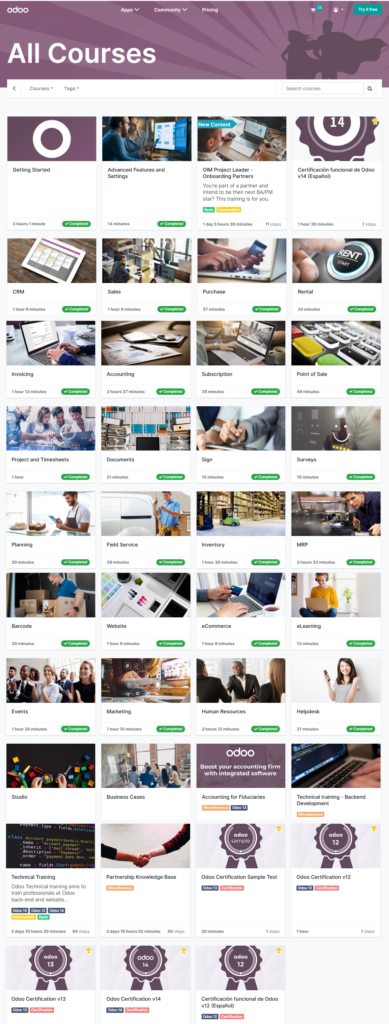
The easy way to learn odoo is from their free online course, its link is https://www.odoo.com/zh_TW/slides/all

I list those topic and content as below list for your reference


Topic/Module
1. Getting Start
Create an odoo database
Navigate in odoo
Business Flow: Furniture Store
Business Flow: Consulting Services
Business Flow: Administrative Department
Business Flow: Construction Project
Business Flow: Restaurant
Business Flow: Events and Marketing
Schedule activities
Odoo Discuss
Contacts and Importing data
2. Advanced Features and Settings
Access Rights
Multi company
3. CRM
CRM Basics and Pipelines
Sales Teams
Leads
Lead Generation
Lead Enrichment
Lead Mining
4. Sales
Sales Basics and Your First Quotation
Product Variants
Online Quotation
Delivery Price
Delivery Lead Times
Dropshipping
Pricelists – Multiple
Pricelist – Computed
5. Purchase
Purchase Basics and Your First Request for Quotation
Purchase Lead Times
Reordering Rules
Call for Tenders
Blanket Orders
3-Way Matching
6. Rental
Rental Basics
Planning and Reporting
7. Invoicing
Invoicing Basics – Sales Invoice
Terms and Conditions (T&C) and Payment Terms
Invoice Payment Methods
OR Code on Invoices for European Customers
Sales Tax and VAT
Fiscal Positions
Extra Taxes (ecotax, alcoloh luxury…)
SEPA Direct Debit Mandates (SDD)
8. Accounting
Accounting Overview
Accounting Basics
Payment Follow up
Bank Statements and Reconcilation
Reconciliation of Invoices with a Cash Discount
Vendor Bills Data Payment (Checks and SEPA Credit Transfer)
Batch Desposit of Checks
Vendor Bill and Rounding Methods
Multi-currencies
Reports and Financial Statements
Analytic Accounting
Closing the Fiscal Year
9. Subscription Basic
Subscription Basics
Upsell Subscriptions
Subscription Reports
Automatic Alerts
10. Point of Sale
PoS Configuration for Retail
PoS Configuration for Restaurant
Return and Refund Products
Control your Cash
11. Project and Timesheets
Get started with Project
Tasks & Sub-tasks
Collaborate on Tasks
Get started with Timesheets
Measuring Project Profitability
12. Documents
Documents Basics
Using Documents With Your Accounting App
13. Sign
Sign Basics
14. Survey
Survey Essentials
15. Planning
Planning Basics and Your First Shift
Manage Shifts and Give Employees Autonomy
16. Field Service
Field Service Basics
Invoice Time and Materials + Worksheets
Advanced Settings
17. Inventory
Inventory Basics & Your First Warehouse Operations
Inventory Adjustment Techniques
Units of Measure
Integrate Landed Costs
Using Routes
Push & Pull Rules
Managing Lots
Managing Serial Numbers
Removal Strategies
Picking Methods
18. MRP
MRP Overview
MRP Basics & Your First Manufacturing Order
Create Your Own Advanced BoMs
WorkCenters & Routings
Use an Alternative Work Center
From Sales Order to Manufacturing Order
Subcontracting
Use the Master Production Schedule
Overall Equipment Effectiveness
Product Lifecycle Management
Managing Quality Checks
Managing Maintenance
19. Barcode
Barcode Basics
Scanning Products in PoS
Scanning Order Receipts and Delivery Orders
Scanning Inventory Adjustments and Internal Transfers
20. Website
Website Basic
Create New Content for your Website
Domain, Language, Website Name and Favicon
Form builder
Search Engine Optimization
Multi-Website
Multi-Language
URL Management
21. eCommerce
Product variants – Frontend
Alternative, Accessory and Optional Products
Managing Your Website Catalog Price
Promotion Programs
Coupon Programs
Allow Several Payment Methods in eCommerce
Configure Your Delivery Methods
22. eLearning
eLearning Basics
23. Events
Events Basics and Your First Event
Create an Agenda for Your Event
Track Your Attendees
24. Marketing
SMS Marketing
Manage Social Media Pages
Compaigns
Push Notifications and Live Chat
Email Marketing
Marketing Automation
25. Human Resources
Human Resources Basics
Attendances
Time Off
Emplyees’ Appraisal
Manage Skills and Resumes
Recruit People
Referral Recruitment
Expenses
Manage Payroll
Fleet Basics
Manage Your Fleet
26. Helpdesk
Helpdesk Overview
Manage SLAs
Receiving Tickets
27. Studio
Studio Basics
Create a New App – Entries Form
Create a New App – Reservation Module
Create a New Report to Print
Studiio: Advanced Tips & Tricks
28. Business Cases
Branded T-shirts: Case
Branded T-shirts: Solution
Motorcycle Company: Case
Motorcycle Company: Solution
AirProof Drones: Case
AirProof Drones: Solution
TecPro 2.0: Case
TecPro 2.0: Solution
Superstar Logistic: Case
Superstar Logistic: Solution
29. Technical training – Backend Development
Introduction
Models, Fields and Relations
Computed Fields, Onchange and Constraints
Actions, Menus and Views
Model Inheritance
View Inheritance
Business Flow
Action, Wizard and Context
Access Rights
Play with the ORM
Reports and Financial Statements
Controllers
Paid Course
30. Partnership Knowledge Base     (US$3964.03  – 3 days throughout 3 weeks)
I am a new partner, what’s next
Getting my first prospect
Demo Techniques
How to do a good qualification
Template – Progress Report
31. Training Technical   (3 days private course throughout 3 weekss)
32. OIM Project Leader – On Boarding Partners    (2 days private course throughout 3 weeks)
33. Odoo Certifications v14       (US$250)

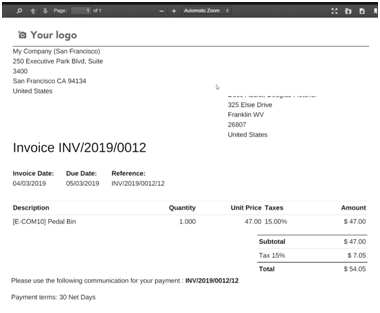
Procedure to automate the creation of vendor bill function from invoice pdf file in Odoo

Step 1) Save an invoice pdf file to odoo Document workspace

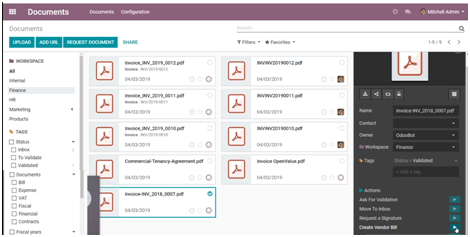
Step 2) select an invoice from Document workspace, and press the play button of “Create Vendor Bill” as below:

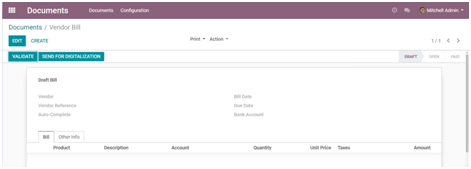
Step 3) Press the “SEND FOR DIGITALIZATION” to auto-read and import the invoice to a payment bill.

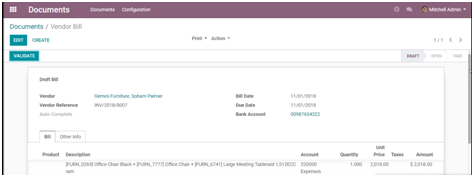
Step 4) The invoice info will be import as below, then you can validate it to confirm the bill, which you can prepare its payment in future.

Appendix:

I. What kind of document can be auto-import:

  • Create Bill
  • Create Customer Invoice
  • Create Credit Note

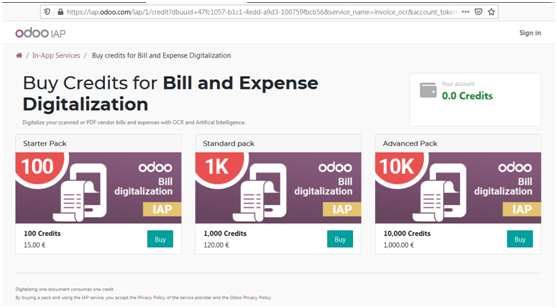
II. The cost of auto-import for each file as below, around HK$1.5 each import :

Diary of IT Man – I start to work as freelance odoo consultant

I kept an eye on odoo application for many years (starting from its openerp time in year 2010). Recently, I realized that it became mature and very active in the business application market. The following are several web site which developed by odoo as:

https://hkcin.org/

https://isaboutique.com/

http://www.officeox.com/

https://www.trippen.com.hk/

http://cmaaustralia.hk:8069/

It is a right time for me the join this odoo job market now. Hope I can get its full time/part time/freelance job soon.

Then, it is the right time for me to join in.

odoo Setup Tips

1. How to commend out coding in qewb xml files?

 use <!– cccccccc –> like html

2. How to redirect company(Internal User) to website home page

as above link described

3. Setup to redirect all user to home page after logon:

Setting -> Technical -> User Interface -> Views -> Search Login -> Edit -> redirect value= “‘/'”

4. Delete the Odoo Promotion Message in footer

WebSite Setting -> Customize -> HTML/CSS/JS Editor -> Find “… Promotion Message” -> comment out the Power by message as     <!–                    ..>

5.  3 user types

  1. Internal users can have full access to Odoo applications
  2. Portal users could be customers or suppliers (with access only to relevant documents)
  3. Public users can only access the website

6.  User Groups

There are three groups for sales

  1. Sales Administrators (Managers)
  2. Sales / User: All Documents
  3. Sales / User: Own Documents Only

7.  POS Start Session Error

Validation Error

All available pricelists must be in the same currency as the company or as the Sales Journal set on this point of sale if you use the Accounting application.

Pycharm configuration error for odoo 14

Problem I got the following error when I configured odoo 14 under Pycharm

——

C:\Users\Administrator\PycharmProjects\odoo1Project\venv\Scripts\python.exe “C:/Program Files/Odoo 14.0.20210331/server/odoo-bin” –conf C:\Users\Administrator\PycharmProjects\odoo1Project\odoo.conf

Traceback (most recent call last):

  File “C:/Program Files/Odoo 14.0.20210331/server/odoo-bin”, line 5, in <module>

    import odoo

  File “C:\Program Files\Odoo 14.0.20210331\server\odoo\__init__.py”, line 75, in <module>

    import PyPDF2

ModuleNotFoundError: No module named ‘PyPDF2’

Process finished with exit code 1

Solution:  Try to install those following and re-run, which should solve the problem

pip3 install werkzeug==0.16.0

pip3 install pypiwin32

pip3 install libsass==0.12.3

pip3 install Babel decorator docutils ebaysdk feedparser gevent greenlet html2text Jinja2 lxml Mako MarkupSafe mock num2words ofxparse passlib Pillow psutil psycogreen psycopg2 pydot pyparsing PyPDF2 pyserial python-dateutil python-openid pytz pyusb PyYAML qrcode reportlab requests six suds-jurko vatnumber vobject Werkzeug XlsxWriter xlwt xlrd

pip3 install PyPDF2

pip3 install polib

Result: I can successfully start odoo under Pycharm as below diagram

Comparison on odoo online, odoo.sh, On-Premise for community and enterprise versions

Recently, I re-picked up the odoo application. I started to use it five years ago, and at that time, its performance was slow and not quite well for usage. Currently, I found that it had a lot of improvement; its function covers many different area from HR, CRM, ERP, e-commerce, POS, helpdesk, project management, online booking, etc. I just got a cert on completed an odoo course. I think it is the right time to invest my time on odoo now, and hope that I can become a freeance on odoo support.

Odoo.sh is an advanced platform compared to Odoo online. Odoo online provides an instance of Odoo basics constraining the users with the usage of same level features provides by Odoo ERP. In Odoo Online platform, there is no provision to use any custom add-ons or custom development of the software which is required by almost every client on this earth as their processes are different, their business workflows are different. Odoo online is not that flexible compared to odoo.sh, as the installation of custom modules is not supported in Odoo online. We can only make the availability of Odoo pre-set modules here. Odoo.sh is scalar in nature allowing the installation of custom modules and further customizations.

FunctionOn-lineOn-PremiseOdoo.sh
Quick/Easy SetupYESYES
Easy maintenance of certified AppsYESYES
Guaranteed 99.9% uptimeYESYES
Automated backupsYESYES
Email ServerYESYES
Odoo certified AppsYESYESYES
Third-party AppsYESYES
Server ControlYESYES
Built-in Developer and System Administration toolsNOT NEEDEDYES

For on-premise installation, it has Odoo Community and Enterprise version. Odoo Community Edition is the free basic version of Odoo supported by open source software. Odoo Enterprise Version, on the other hand is a paid and upgraded version that is more suitable for high value, niche market. Odoo Enterprise Version offers unlimited functional support, version upgrade and Public or Private Cloud hosting in contrast to Odoo Community Version. High speed and performance also differentiate Odoo Enterprise version from Community version.

General Support FunctionEnterpriseCommunity
Unlimited Functional supportYesNo
Upgrades (including your database)YesNo
Public and Private cloud hostingYesNo
User InterfaceEnterpriseCommunity
Desktop – Web BrowserYesYes
Mobile version – Android and Apple phonesYesNo
Studio AccessEnterpriseCommunity
Screen CustomizationYesNo
Report DesignerYesNo
Menus EditorYesNo
Apps CreatorYesNo
Sales ManagementEnterpriseCommunity
Relationship Management (CRM)YesYes
Sales quotations and ordersYesYes
Customer Portal and online paymentYesYes
Digital Phone (VoIP) IntegrationYesNo
Document ManagementYesNo
eSignaturesYesNo
Digital, Subscription and Rental ProductsYesNo
HelpdeskYesNo
Field servicesYesNo
Repair servicesYesNo
Cohort, Dashboard, and Map ViewEnterpriseCommunity
Kanban, list, calendar, and bar graph viewYesYes
new cohort, dashboard, and Map viewYesNo
Inventory ManagementEnterpriseCommunity
Purchase ManagementYesYes
Barcode supportYesNo
Shipping ConnectorsDHL Express, UPS, USPS, FedEx, BPost, EasyPostYesNo
Inter-company AutomationYesNo
Accounting ManagementEnterpriseCommunity
Invoicing & PaymentsYesNo
Full Accounting(Bank Statement Imports, Billing Digitalization, Budgets,Checks, Consolidation, Localizations, Reports, …) YesNo
Manufacturing ManagementEnterpriseCommunity
Resource Planning (MRP)YesYes
Advanced Resource Planning (MRP II)-Work center Control Panel and SchedulingYesNo
Internet of Things (IoT)- Cameras, Footswitches, Scales, Measurement ToolsYesNo
Product Lifecycle Management (PLM)YesNo
MaintenanceYesYes
QualityYesNo
Shipping Connectors- DHL Express, UPS, USPS, FedEx, BPost, EasyPostYesNo
Project ManagementEnterpriseCommunity
Projects and TasksYesYes
Timesheets and task logsYesYes
Planning and ForecastingYesNo
Human Resource ManagementEnterpriseCommunity
Employee DirectoryYesYes
ExpensesYesYes
LeavesYesYes
RecruitmentsYesYes
ExpensesYesYes
PayrollYesNo
AppraisalsYesNo
ApprovalsYesNo
Employee ReferralYesNo
Departments DashboardYesNo
Point of Sale ManagementEnterpriseCommunity
Retail Point of SaleYesYes
Restaurant Point of SaleYesYes
Loyalty Programs and Gift CardsYesNo
Website BuilderEnterpriseCommunity
Website BuilderYesYes
BlogsYesYes
PresentationsYesYes
ThemesYesYes
Form BuilderYesNo
Call-to-Actions BlocksYesNo
VersioningYesNo
A/B TestingYesNo
E-commerceEnterpriseCommunity
Web Store and Shopping CartYesYes
Shipping ConnectorsDHL Express, UPS, USPS, FedEx, BPost, EasyPostYesNo
Amazon ConnectorYesNo
Automatic Sales TaxYesNo
Marketing ManagementEnterpriseCommunity
Events ManagementYesYes
Email MarketingYesYes
Live ChatYesYes
Social media MarketingYesNo
SMS MarketingYesYes
Marketing AutomationYesNo
Lead ScoringYesNo
Email Marketing TemplatesYesNo
MiscellaneousEnterpriseCommunity
E-LearningYesYes
ChatYesYes
Google Integration- Accounts, Calendar, Docs, SheetsYesYes
Fleet ManagementYesYes
Web Services Integration (API)YesYes
Online Appointment SchedulingYesNo

Price Comparison for Hosting Plan

According to the price comparison of hosting plan between hostgator.com and contabo.com , hostgator is cheaper, but it does not support script installation. Hence, it may a good choose to use contabo for manual application installation, such as install odoo. Moreover, as compare to AWS and Alicloud, these two will be more expensive than the contabo hosting plan.